Thursday, November 13, 2014

Oracle EBS Upgrade Factory

Oracle E-Business Suite (EBS) Upgrade Factory:
Oracle has a commitment to help customers benefit from the latest technology, and has developed a packaged offering to help customers upgrade to Oracle E-Business Suite Release 12 in the cloud, called E-Business Suite (EBS) Upgrade Factory.

Several recent surveys detail why CFOs are increasingly open to moving their enterprise applications into the cloud. For example, a 2012 survey by Financial Executives Research Foundation (FERF) and technology advisory firm Gartner found that 53 percent of CFOs believe that more than half of their enterprise transactions will be delivered through software-as-a-service over the next four years, up from 12 percent today. In addition, almost 70 percent of CFOs surveyed in 2012 by Oracle Corp. said they would consider moving to a cloud-based version of their core enterprise software.


The  Oracle EBS Upgrade Factory was built to be the fastest and lowest-risk way possible to move from a Release 11 on-premise EBS instance to an on-line Release 12 instance. This offering provides a comprehensive, end-to-end process for moving customers into the cloud and upgrading them to the latest release.


The EBS Upgrade Factory includes the following project phases, all bundled into a single package:

• Migration to the Managed Cloud Services Environment
Technical Upgrade : includes upgrade of the platform, Oracle Application Server, Oracle Database, Oracle Forms and Reports, and Oracle Applications.
Customizations, Extensions, Modifications, Localizations and Integrations (CEMLI) Upgrade : includes determining technical impact of Oracle E-Business Suite Release 12 on CEMLIs, upgrading CEMLIs to the new technology stack, retrofit of CEMLIs for compatibility and usability on Oracle E-Business Suite Release 12, and assistance in resolution of issues with CEMLI execution.
Functional Upgrade : includes the basic steps needed to configure and set up the new system, and orientation around new functionality. This is a very lean and cost-effective approach to functional upgrades. Oracle Consulting provides additional support for customers who wish to change their business flows.
Functional Testing : includes applying Oracle’s expertise to assist customers in updating their Oracle E-Business Suite test scripts to reflect valid navigation paths for Oracle E-Business Suite Release 12.
•Run and Maintain Services :Oracle Managed Cloud Services runs more instances of Oracle Applications and Oracle operating systems than any other provider in the industry


Source: Oracle.com


Saturday, November 1, 2014

How to change Valuation Accounts, Cost Variance accounts due to Merger, transformation and dissolutoin of business entities.

What are the options available in Oracle EBS when the material account code, valuation account code etc needs to be changed due to Merger, transformation and dissolutoin of business entities as Standard functionality appears to lock down the valuation accounts on the organization setup form.

This is the intended functionality.The valuation account field defined under costing tab in organization Parameter is not editable and under other accounts . User cannot amend the Material Account, Cost Variance Account and Expense Account through the Organization Parameters form if on-hand or history exists and the Organization is using Average Costing. This is the intended functionality. When using Average Cost method, the Material Valuation Account cannot be changed.

The valuation account field defined under costing tab in organization Parameter is not editable. When needing to change the account information defined for accounts like:- Outside processing. Material overhead. Resource. Expense etc The Accounts cannot be changed once the setup is done and if ANY transactions exist.

As changing the account association will have major repercussions on the distributions that are created for the transactions in the INV Sub-ledger and GL if you changed the accounts after transactions has been made you will not be able to close the accounting period.

When needing to change the account information defined for accounts like:- Outside processing, Material overhead, Resource, Expense, Cost Variance Accounts.
The Accounts cannot be changed once the setup is done and if ANY transactions exist.
As changing the account association will have major repercussions on the distributions that are created for the transactions in the INV Subledger and GL  if you changed the accounts after transactions has been made you will not be able to close the accounting period.

Option1: Create New Organziation standard process:
 
1. Standard advice is to create a new Inv Org, with the required valuation accounts ,assign all the items to it that are in the existing org, transfer item quantities to the new org, create a new all POs and sales orders, WIP jobs, etc.

2.When you define the new inventory org, the system will assign all of your organization level valuation accounts to a cost group. If you are not using WMS, this is the only cost group that can be used. Under standard costing your subinventories can have different valuation accounts (and hence different cost groups), but in average costing this is only possible if using WMS . Be sure your client is aware of this restriction if they currently have different accounts for different subinventories.

When WMS is installed or for WMS enabled organization, subinventory valuation accounts get the values from organization level if the costing method is standard costing and does not allow the user to update / modify the accounting segments directly on the subinventory level.

3.The transfer should be planned for ahead of time to close all possible work orders in the old organization and then open new ones in the new average cost organization. Don't try to open a half finished work order in the new org - finish it out in the old.

4.If you have any open sales orders or purchase orders, you will have to update the pick from and deliver to organizations in the SOs and POs. Note that in an average cost org, there will not be any purchase price variances since there are no standards. Invoice price variances will continue to be calculated.

5.Once all activity is transferred, do the month end close process in the old org, and then deactivate it. If you are using Organization Access, be sure to unlink responsibilities from the old org and tie them to the new org when you are ready to commence using it.

6.Be sure that your client is made aware of the need to monitor costing activity in the new org.  Transactions are costed in date/time sequence, and if a transaction is 'stuck' and cannot be costed, no later transactions will be costed until the cork is removed from the bottle.  Transactions should be brought over to the general ledger at least once a week so that uncosted transactions can be caught and resolved early. Having uncosted transactions will prevent them from closing the month.

7. Be sure that if there are any custom program or customization related to that OLD org is pointed to the new Org.

a.There is no on-hand quantity.

- select organization_id, inventory_item_id, primary_quantity 
  from mtl_onhand_quantities_detail
  where organization_id = &orgid and subinventory_code = '&subcode';

b.There are no un-costed transactions.

 - select count(*)  from mtl_material_transactions
   where organization_id = &orgid
   and subinventory_code = '&subcode'
   and costed_flag is not NULL;

  c.There are no pending transactions

-select count(*)
 from mtl_transactions_interface
 where organization_id = &orgid
 and subinventory_code = '&subcode';

- select count(*)
  from mtl_material_transactions_temp
  where organization_id = &orgid
  and subinventory_code = '&subcode';

Option2: Use Copy Inventory Organziation feature and change the Valuation accounts using update script.
1.Unassign the location which is assigned to the eixsting org to copy to a new inventory org, if this is not done prior to running the copy inventory organzation you will not see the location name in the Location name in the maintain Interface form.

Responsibility: US Inventory Super user
Navigation: Setup > Organization > Organization Copy > Maintain Interface

When you define new organizations in the Copy Organization Interface window, new inventory organization records are saved in the Copy Organization Interface table.
The following information describes the required parameters to create new organizations:

• Group Code
• Organization Name
• Organization Code
• Location Name.


1. Enter a Group Code to identify your new organization records.
The Group Code is used by the Copy Inventory Organization concurrent program to identify and group together all the individual organization records that will be processed in a single concurrent request.

2. Enter an Organization Name for the new organization. The Organization Name is the name of the organization that will be created by the Copy Inventory Organization concurrent program.

3. Enter an Organization Code to identify your new organization. The Organization Code is a code that the Copy Inventory Organization concurrent program will use to uniquely identify the new organization.

4. Name an existing location for each organization that you want to create, or define new locations in the XML template. If you are using existing locations, they must not already be assigned to an organization. If you create a new location in the XML template, the location definition must precede the related organization definition.
for more information please go through the copy inventory organzation implementation guide.

Note: Cost type and cost sub-element data in the Inventory Organization parameters. Copy of Process enabled, WMS enabled, and cost sharing organization entities are not supported.
 Copy inventory organization: Execute the Copy Inventory Organization Concurrent Program to create the new inventory organizations that you previously defined.

Model Organization:Choose an inventory organization from the list of values as your model organization. This organization is used to derive all inventory parameters that you wish to copy.

Group code:Choose a Group Code from the list of values. The group is a collection of individual inventory organization records that you wish to process in a single concurrent request.

Assign to Existing Hierarchies:If yes, all new organizations will be assigned to the same hierarchies as the model organization.
If no, the organizations will not be assigned to the model organization’s hierarchies.
You can run the Hierarchy Exceptions Report to list organizations that have not been assigned to hierarchies.

Copy Shipping Networks: If yes, all the model inventory organization’s Shipping Network setup information will be copied to the new organization.
If no, the shipping network setup will not be copied.

Copy items:If yes, all items activated in the model organization will be copied and activated in the new organizations If no, no items will be copied. Item assignment is a one time process and can not be undone. There is a separate concurrent program that can be run to assign items.

Copy BOM:If yes and if Bills of Material have been created in the model organization, all BOMs will be copied to the new organizations. If no, Bills of Material will not be copied.

Copy Rountings: If yes and if routings exist in the model organization, all routings are copied to the new organizations. If no, routings are not copied.

Purge:If yes, all records from the Interface Table will be purged.
If no, the records will not be purged. Records with Fail will not be purged even if you have selected yes.

How to change Inventory  Valuation accounts for an old inventory organization that were are no longer used for inventory.
Please do appropriate backup procedures. Retest the issue in a test instance; verify if the issue was resolved before promoting to Production.

1. For the organization which doesn't use any inventory but has invalid account use the following update sql statement to update the accounts:

update mtl_parameters
set MATERIAL_ACCOUNT = &new_material_account_id,
MATERIAL_OVERHEAD_ACCOUNT = &new_moh_account_id,
OUTSIDE_PROCESSING_ACCOUNT = &new_osp_account_id,
RESOURCE_ACCOUNT = &new_resource_account_id,
OVERHEAD_ACCOUNT = &new_overhead_account_id,
EXPENSE_ACCOUNT = &new_expense_account_id where organization_id = &organization_id;


2. For the cost group accounts for the organization in question, please use the following update sql statements to update the accounts if the accounts are invalid :

update cst_cost_group_accounts
set MATERIAL_ACCOUNT = &new_material_account_id,
MATERIAL_OVERHEAD_ACCOUNT = &new_moh_account_id,
OUTSIDE_PROCESSING_ACCOUNT = &new_osp_account_id,
RESOURCE_ACCOUNT = &new_resource_account_id,
OVERHEAD_ACCOUNT = &new_overhead_account_id,
EXPENSE_ACCOUNT = &new_expense_account_id
where organization_id = &organization_id and cost_group_id = &cost_group_id ;

The cost group ids can be retrieved from the cost group accounts form. Before doing this change make sure that no values exist in GL for the old accounts .

3 If you want the new cost variance account to be used in costing of future transactions, using a simple SQL statement to update mtl_parameters & cst_cost_group_accounts tables should be fine.

update mtl_parameters
set AVERAGE_COST_VAR_ACCOUNT=&your_ccid
where organization_id=&your_org_id;

update cst_cost_group_accounts
set AVERAGE_COST_VAR_ACCOUNT=&your_ccid
where cost_group_id=&your_group_id;

commit;

Reference: support.oracle.com ,#158720.1,#565995.1,#1469836.1,#746326.1,#1056675.1,#1144105.1,# 568078.1.

Sunday, October 26, 2014

Oracle Integration Repository (IREP)

Oracle Intergration Repository:
The Oracle Integration Repository is a compilation of information about the service endpoints exposed by the Oracle E-business Suite of applications.

It provides a complete catalog of Oracle E-Business Suite’s business service interfaces. The tool lets users easily discover and deploy the appropriate business interface for integration with any system application.
The Oracle Integration Repository is shipped as part of the E-Business Suite. As the instance is patched, the repository is automatically updated with content appropriate.

The APIs were listed in the user guides. Since the Release 12, they are not anymore but you read instead to refer to the integration Repository (IREP) :

Oracle Intergration Repository, an intergral part of oracle E-business suite is a compliation of information about the numerouse interface endpoints exposed by Oracle Applications.


The full list of public API's and the purpose of each API is available in the intergration repository.
For information on how to access and use Oracle Integration repository see accessing Oracle Intergration Repository User guide.

How to Access IREP:

1. From E-business suite:
Responsibility: Intergration Repository
Note: user should have enough privileges like SYSADMIN

2. From the web: url: http://irep.oracle.com

How to use integration Repository:

There are couple of ways to use the intergration repository:

1. Navigation through the catalog
2. Use of the search page.


Monday, October 13, 2014

Price Hold Expected As It Exceeds Price Tolerance But Invoice Not On Hold.

Issue: Invoice unit price -> (Purchase Order (PO) unit price x % tolerance) but invoice is not going on price hold. As a result the supplier has been overpaid as the invoice passed the approval process.

Invoice Price Tolerance = 5%
PO price = .70 PO qty = 1
INV price = 19.20 INV qty = 1

The current functionality in Accounts Payable is not clearly documented. The current documentation states that PRICE HOLD will be place on invoice if:

INVOICE UNIT PRICE >  (PO UNIT PRICE x (1 + % tolerance))

UNIT_PRICE in AP_INVOICE_DISTRIBUTIONS > PRICE_OVERRIDE in PO_LINE_LOCATIONS (PRICE Hold)
Weighted average price of all distributions on the matched invoice and all price corrections related to the invoice is more than
[purchase order unit price (1 plus% tolerance)]

Unit Price - P.O./Invoice. Unit price of the item from the purchase order line/invoice. Payables compares the unit prices for a purchase order and matched invoice and applies a Price hold to an invoice distribution if the invoice unit price exceeds the purchase order unit price by more than the tolerance level you allow.

Price. The average price of all matched invoices exceeds purchase order price.

System uses average unit price in ap invoices and po unit price to calculate price variance.
Variance = (Inv amt/qty) - (price tolerance * unit price)

If unit price is with lots of decimals. For these cases users can define tolerance with some minimal positive percentage(0.5 to 1).
So system does not place price hold with this tolerance.

Responsibility: Accounts payables super user
Navigation: Setup -  Invoices - Tolerance
Check the PO matching zone what is price%

a) select * from PO_headers_all
where segment1 in (301977,272062); ----- PO#

b) select * from po_lines_all
where po_header_id in (1149476,1184290); ---- get the po_header_id from the above script.

c) Select SUM(NVL(PD.quantity_billed,0)), (SUM(NVL(PD.amount_billed,0)))
FROM po_distributions_all PD
WHERE PD.line_location_id in (2704791);

d) Select sum(D.quantity_invoiced), sum(nvl(D.amount,0))
FROM ap_invoice_distributions_all D,
po_distributions_all PD
WHERE D.po_distribution_id+0 = PD.po_distribution_id
AND PD.line_location_id in (3129997);

e) Select SUM(NVL(PD.quantity_billed,0)), (SUM(NVL(PD.amount_billed,0)))
FROM po_distributions_all PD
WHERE PD.line_location_id in (3129997);

Calculate the average unit price = Amount Billed/Quantity Billed.
PO#301977 – unit price is 247.5
AUP= 495/95 = 5.21053

The PO price is being compared to the AVERAGE price of ALL THE INVOICES MATCHED to the PO. So if the average price of all the invoices is greater than the PO price and the tolerance, then the

PRICE hold will come on, even if the current invoice is equal to or less than the PO price.

In both the above cases the AUP is greater than the PO price and the tolerance.

Run the APLISTH script which will provide more details , once you run the aplisth script you can make a note of the columns like invoice_id, Line_Location_ID  so that you can run tbe below script to check further.

SELECT AID.invoice_id, PD.line_location_id SHIP_ID,
DECODE(SUM(nvl(quantity_invoiced,0)),
0, 0,
null,0,
(nvl(sum(decode(nvl(unit_price,0)*nvl(quantity_invoiced,0),0,amount,
nvl(unit_price,0)*nvl(quantity_invoiced,0)
)
),0) /
sum(nvl(quantity_invoiced, 0)))) avg_price
FROM ap_invoice_distributions_all AID,
po_distributions_all PD
WHERE ( AID.parent_invoice_id =
OR AID.invoice_id = )
AND AID.po_distribution_id = PD.po_distribution_id
AND PD.line_location_id =
AND AID.line_type_lookup_code = 'ITEM'
GROUP BY AID.invoice_id, PD.line_location_id;

References:
A documentation Bug 1149642 has been logged to update the current documentation to be clear and concise. In addition, an enhancement Bug 1149668 has been been approved by development to have a setup option so users can have the price hold be per invoice or for all invoices for a PO.

Source: support.oracle.com, AP User guide, etrm guide.  

Friday, October 10, 2014

Oracle E-Business R12.2.4

Oracle E-Business Suite 12.2.4 now available which enables high availability for global operations
1. Online Patching for reduced downtime
  • Functionality leverages Oracle 11g R2 Edition-Based Redefinition features to support online patching
  • Patches can be applied while the production system is fully operational
  • Only a short downtime is required to complete patching process
  • The amount of downtime required by any patch will be consistent.
  • Online Patching cycle includes 5 phases.
  • Application is only offline during the “Cutover” phase
  • Online Patching is used to apply all patches in 12.2.
R12.2 Functional  Highlights:
ERP
– Enhanced Labor Costing with Projects & Payroll
– Project Cost Breakdown Structure
– Contract Lifecycle Mgt for Public Sector (CLM): Electronic Contract File, Concurrent Modifications, more
– Channel Revenue Mgt: Simplified HTML Flows
– Global Enhancements
– Supplier Governance & Oversight with SLM
– Comprehensive Contract Mgt with CLM
– Improve Projects-Based Procurement

SCM
– Order Mgt: Selling Subscriptions
– Order Mgt / WMS: Advanced Catch Weight
– WMS: Mobile Personalization
– MES: Electronic Kanban (E-Kanban)
– MES: Express Transact for Serialized Mfg
– SCM: Contingent Worker Support.
– Outsourced Manufacturing for OPM
– Seller’s Workbench: Margin Analysis, Upsell
– Yard Management

Multi-Unit of Measure Fulfillment:

1. R12 Dual Unit of Measure
  • Enter transactions in primary and secondary UOM
  • Allocate in primary UOM but record fulfillment in both UOM
  • Price iu primary or secondary.
2. R12.X Multi UOM  Fulfillment.
  • Fulfill in primary or secondary UOM
  • Allocate & reserve in multiple UOMs
  • Enhanced inventory tracking, invoicing & shipping in multiple UOMs
New HTML Order Managment UI

- HTML Web UI
- User Configurable
- Modern Look and feel
- Tablet Friendly layout.
-Weblogic server for application server
-simplified User flows

New User Interface Features in Release:
1.New skin
2.Rich table interactions
3.Simplified home page
4.Support for gestures on tablets.

The most obvious user interface change for this release is our new skin for both desktops and tablets. The new skin provides a cleaner look and feel in Oracle Application Framework-based pages, with responsive features that give you more space for controlling the application with your fingers on a tablet while saving space on a desktop. Here is the new look on a tablet and on a desktop.

A streamlined touch-oriented, icon-based global header (the top navigation bar on the page). Users can choose whether to display icons, text links, or both by setting a user preference. This feature is one of the results of the usability testing we did last year, where we got user feedback for fine tuning the new look and feel. 
 
New Table Features :

The new user interface enhancements in tables and hierarchical grids (a special type of table that lets you expand and collapse rows, also known as HGrids).

Our new table enhancements provide a much more interactive experience for tables. Customers have been requesting these enhancements for a long time:

• Reordering columns
• Resizing columns
• Hiding and showing columns
• Detaching tables from the base page (except HGrids)
• Scroll horizontally if the contents of a table exceeds the browser width
• Refresh a table by querying for the latest records
• Reset a table back to its original definition

When reordering, hiding, and resizing columns, the changes are specific to each user and will persist until the user changes them again.
These features are available on:
• Desktop versions of OA Framework-based pages
• iPads running Safari
• Android tablets.

Prerequisites:
You must have the following profile options set in EBS 12.2.4:
• Oracle Applications Look and Feel profile option to "Skyros Look and Feel"
• FND: Enable Rich Table Interactions profile option to "True"

The table button bar contains the following new icons:
1. Detach Table
2. Refresh Data
3. Reset Table Settings
4. Table Settings.

Thursday, October 9, 2014

Oracle E-Bus : The XXXX is not a Valid Responsibility for the current user. Please Contact System Adminstrator.

You have have granted a user access to a new web-based responsibility but the middle-tier application servers have not picked up this change.

How to clear the cache on the middle-tier application server's . You have sys admin access and you have givne Web application respsonsibility to your self  example Internenxt Expenses or Workflow Adminstrator or Function Adminstrator  etc and when you select any form or menu you get a error message  "XXXX is not a valid responsibility for the current user. Please contact your System Administrator". where XXXX is "Internet Expenses ",  “Workflow Administrator or Functional Administrator"


You only get this issue with Web-based responsibilities. If I'd assigned "Receivables Manager" then it works without any issues, the reason for this error is that in order to improve performance Oracle caches some information on the web server. In order to "fix" this problem we need to clear the cache by following these steps;
 
Step 1: Log in and select the "Functional Administrator" responsibility

Now this is where we get a delicious taste of irony; this responsibility is web-based so if you are trying to fix a problem that's occurring now and you don't already have this responsibility then I'm afraid you're too late. You'll have to bounce the Apache server (something that will require a DBA). In short; you need to have granted yourself this responsibility BEFORE you run into problems!

Step 2: Select "Core Services"
Step 3: Select "Caching Framework" 
Step 4: Select "Global Configuration" 
This page shows you the currently configured Caching Statistics and Policy. "Clear All Cache" button the right-hand side.


Step 5: Click "Clear All Cache"
log out and login and check the web application and it should display the web application responsibility information.

Sunday, June 29, 2014

Oracle unified method (OUM)

Oracle announced the retirement of AIM and ABF in 2011
•Oracle Application Implementation Method (AIM)
•Oracle AIM for Business Flows (ABF)

Oracle Unified Method(OUM) :
OUM release 6.1 provides support for Application Implementation, Cloud Application Services Implementation, and Software Upgrade projects as well as the complete range of technology projects including Business Intelligence (BI), Enterprise Security, WebCenter, Service-Oriented Architecture (SOA), Application Integration Architecture (AIA), Business Process Management, Enterprise Integration, and Custom Software. Detailed techniques and tool guidance are provided, including a supplemental guide related to Oracle Tutor and UPK.
- OUM to accelerate your development and technology-based efforts;
 - OUM presents an organized and flexible approach.
- Operational framework helps critical project needs and dependencies for development and implementation of project.
- Move efficiently through the project lifecycle to quickly achieve measurable business results.

Components of OUM:
With OUM, you receive the following:
Overview Materials – Provides an overview of OUM’s approach to IT projects, including the
industry standards upon which OUM is based.
Guidelines – Phase, process, task, role, and output guidelines that cover every aspect of an Oracle-based business solution.
Templates – Templates enable fast and easy creation of high quality outputs.
Tailored Work Breakdown Structure – These standards enable an easy start in managing your
project.
OUM supports the complete range of Oracle technology projects including:
 - Oracle Database
- Oracle E-Business Suite
 - Oracle Enterprise 2.0
- Oracle Fusion Middleware
- Oracle Data Warehousing
- Identity Management (IdM)
 - Oracle Transportation Management
- Performance Management
- Business Intelligence and Analytics
 - JD Edwards Enterprise One
- PeopleSoft Enterprise
 - Siebel

Vision for OUM is a single, integrated method to support the entire Oracle economy across the complete suite of Oracle projects. The “best of the best” of Oracle’s portfolio of methods is being coupled with OUM’s industry standards, new techniques, and strong tool support.

There are many exciting changes incorporated in OUM as compare with AIMS:
The primary Benefits of using UOM are:

More Focused Effort - OUM enables projects to clearly define business scope and needs to createenterprise business process models.
Built-in Flexibility - By combining activities and tasks in different ways, OUM can be applied to many types of information technology software development and implementation projects.
Saves Time - Seasoned information technology practitioners representing years of experience have contributed their knowledge to OUM.
Higher Quality - OUM subscribes to an iterative approach that incorporates testing and validation throughout the lifecycle.
More Cost Effective - OUM facilitates improved control of project expenses by using a flexible work breakdown structure that allows you to perform only necessary tasks.
Reduced Project Risk - Implementing an iterative, broadly applicable method mitigates requirements mismatch. A key focus of each iteration in OUM is to identify and reduce the most significant project risks.


Difference between OUM's approach and AIM for Business Flow's (ABF) conference room pilot approach:
  1. AIM for Business Flows (ABF) utilized iterative conference room pilots (CRPs) to initially map the client's business to the standard Oracle Business Flows and to refine/tailor the business solution to the specific requirements of the project.
  2. However, most of the other elements of the ABF approach were more waterfall than interative. OUM is a true iterative approach. Virtually any and all activities and tasks are performed in an iterative fashion based on an iteration plan developed by the project manager.
  3. While any OUM task or activity can be iterated as necessary to meet project objectives, keep in mind is that you should do only what is necessary to meet the project objectives - nothing more. Make the method serve you - not the other way around.
  4. One significant similarity between OUM's Application Implementation View and ABF is that both methods use the Conference Room Pilot (CRP) technique to refine and iteratively converge on a business solution best suited to the client's requirements. In OUM’s Application Implementation View, Conference Room Pilots are referred to as Functional Prototypes.
  5. It is in name only that JCDM was limited to J2EE. JCDM’s framers designed the method to be technology agnostic. JCDM, and therefore OUM, provides a broadly applicable, yet cohesive collection of activities, tasks, artifacts, roles and responsibilities, and guidelines for technology-based business solutions. In the transition from JCDM, OUM immediately became the single method for technical architecture, technology implementation, and custom software development at Oracle.


Friday, April 25, 2014

Oracle Application Development FrameWork (ADF)


Oracle ADF is an end-to-end application framework that builds on Java EE standards and open source technologies to simplify and accelerate implementing Java EE applications. It is fully extensible and customizable by adding or modifying libraries.

ADF simplifies the tasks of:
• Creating business services
• Designing user interfaces to access those services

Oracle ADF simplifies Java EE development by minimizing the need to write code that
implements design patterns and the application infrastructure. These implementations are
provided as part of the framework. Oracle ADF also provides a visual and declarative
development experience that minimizes the need to write code and reduces the learning curve for 4GL developers.

Business services are implemented as metadata, enabling them to be bound to user interfaces in the same manner regardless of the technology employed in the underlying data model. The use of metadata also enables business rules for databound fields to be specified at the model layer, along with labels, validation, and tool tip properties.
 
Oracle ADF Big Picture:


Increases Productivity and ease of use
- visual and declarative development
- Takes care of teh plumbing code
- implements best practices
 
Promote service oriented development
-Re-usable business services
-Composite applications development
 
Standards-based
-Java EE, SOA, SDO/SCA
 
End to End converge
-MVC, Security, Customization
 
 
for more information and training, Demos,Best Practices etc, please go through the link give below:

http://www.oracle.com/technetwork/developer-tools/adf/overview/index.html

Sunday, January 19, 2014

How to Purge Quotes

Purge Quote Process:

Purging old data creates space in your database and can improve performance of

transactions and maintenance

Step 1.  Order management responsibility > Order,return>purge> Quote purge selection.


Step 2: Order Management responsibility > Order, return > Purge > Purge Set:

A purge set is a set which will contain Quote to be purged based upon user

specified criteria. Query the purge set name defined in Step 1.

Step 3 : Click Submit purge, Request Id is dispalyed make a note of the request ID and query in concurrnet  program.


Order purge Program will be submitted.


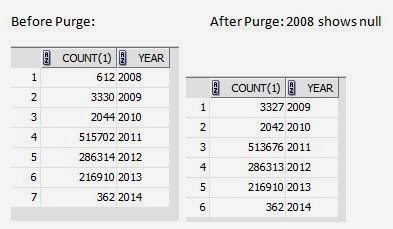
Quote count(Offer Expired and Lost):

SELECT
count(1), SUBSTR(tO_CHAR(TRUNC(OOH.LAST_UPDATE_DATE),'DD-MM-YYYY'), 7,10) year
FROM oe_order_headers_all ooh,  oe_transaction_types_tl ott, oe_order_sources os1, oe_order_sources os2
WHERE
ooh.order_type_id = ott.transaction_type_id
AND ooh.order_source_id = os1.order_source_id(+)
AND ooh.source_document_type_id = os2.order_source_id(+)
AND ott.LANGUAGE =( SELECT fl.language_code
FROM fnd_languages fl
WHERE fl.installed_flag = 'B')
and ooh.transaction_phase_code in ('N')
AND ooh.flow_status_code IN ('OFFER_EXPIRED','LOST')
GROUP BY SUBSTR(tO_CHAR(TRUNC(OOH.LAST_UPDATE_DATE),'DD-MM-YYYY'), 7,10)
order by year;