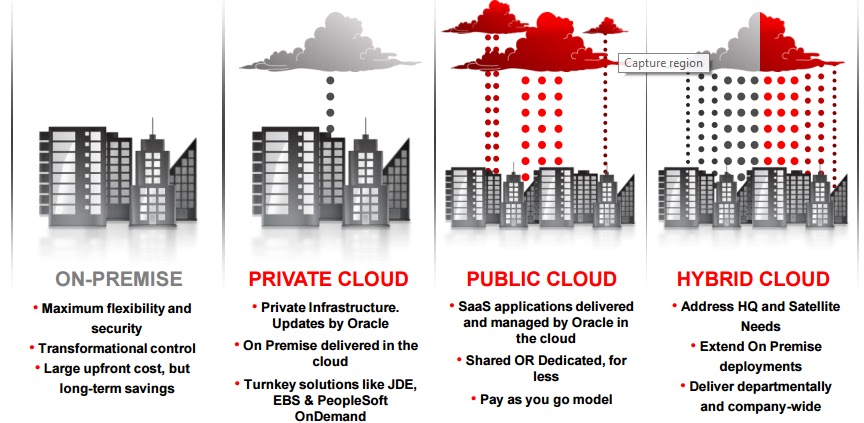
Oracle Cloud Best Practice Framework:


Best Practice Tools:

Platform as a Service - PaaS: Complete suite of industry standards based platforms services. - SQL Database, Hadoop, NoSQL, Java Middleware, Node.js, Ruby, PHP etc.
Infrastructure as a Service - IaaS: Secure , reliable, low Cost, standards based infrastructure services - OpenStack, Linux OS, Xen VM, Docker.
Oracle Testing as a Service - TaaS:Secu is a cloud based platform for delivering automated application testing services on demand automated provisioning of complete test labs that includes ability to deploy complex multi tier applications, test tools and test scripts example oracle application testing suite (OATS)


SAAS Environment:

SaaS vs On Premise :
Cannot run SQL directly against a cloud environment (either use reporting tools to query the data or log a Service Request in My Oracle Support – there is 2 day lead time for Cloud Operations to perform this)
Descriptive Flexfields are loaded by Cloud Operations (log an SR – there is a 3 to 4 day lead time)
OIM – Single Sign On: Plan for 2 weeks to coordinate security integration
2 instances vs. typical 5 instances (on premise)
SAAS means Shared:
-Shared Hardware
-Shared Software
-Shared Support
Note:
The manual tasks required to migrate setup and other configurations from Test to Production
Not an automatic process that can be requested
Tools used Functional Setup Manager, File Based Loader
Typically performed after User Acceptance Testing is completed and deploying to production
GOING LIVE – THINGS TO CONSIDER
Go-Lives
-Generally timed to 1 to 2 weeks after the Scheduled Update Bundle is applied to Production
-Schedule well in advance, especially for Cloud Operations activities such as P2T
-Assure latest fixes have been applied before Go-Live
-Assure Production and Test are in sync
-perform P2T after production cutover
-Other considerations before Going-Live
-Clean bill of health from final project review
-Coordination across other business
-Critical activities (period or year-end, statutory reporting or tax cycles)
-Communications and training completed for all users and stakeholders
-Solutions for critical SRs in place
-Onsite/on-call assistance available during critical cutover activities
Scheduled updated cycle:
-TEST environment(s) are updated on the 1st weekend of each month
-PRODUCTION environment is updated on the 3rd weekend of each month
-You can review information about the contents of each monthly update by referring to Oracle Fusion -Applications Known Issues and Update Documents
-This is revised with information for the latest monthly update on the first Friday of each month
-Environments are synchronized between 3rd weekend of a month and the 1st weekend of following
month
a) Recommended Go-Live window
b) P2T window for customers who are not on Concurrent
- Updates cannot be skipped or deferred
- Quarterly infrastructure maintenance windows are advised in advance
- During UAT/Transition to production, your project plan should allow additional time to apply required updates.
- On average 2 per calendar year
- Mandatory for all customers – cannot be skipped
- During an upgrade cycle, customers are notified via email that a new release is available. Customers can then select an upgrade slot that works in support of their business needs by completing the Upgrade Survey.
- Oracle offers a sizable 2-3 month window within which customers can select their upgrade slot. If customers do not respond to the upgrade survey, the upgrade will be scheduled by ERP Cloud Operations.
- Oracle ERP Cloud only supports current release and immediate previous release of the cloud service. Thus as the General Availability date for a new version of the cloud service nears, all customers will be encouraged to move to the latest release.
- The rapid pace of innovation and release schedule for Oracle ERP Cloud drives the need for customers to upgrade within the afore-mentioned 3 month window. While customers have the flexibility to remain on their current release until their upgrade slot, customers cannot skip releases.
Occur for both implementing and in-production customers
- Unlike monthly updates, upgrades primarily deliver new functionality
- Implementing customers should include upgrade tasks in their project plan
Cloud SR: I need an operations service (e.g. Production to Test copy, Enable Single Sign On, Language Pack application).
Software SR: How does the product work? , Product not working as expected, I need an enhancement.
Occur for both implementing and in-production customers
- Unlike monthly updates, upgrades primarily deliver new functionality
- Implementing customers should include upgrade tasks in their project plan
Cloud SR: I need an operations service (e.g. Production to Test copy, Enable Single Sign On, Language Pack application).
Software SR: How does the product work? , Product not working as expected, I need an enhancement.
Report Types Icons: