Saturday, March 20, 2010

Days sales Outstanding(DSO)

Days Sales Outstanding :
A measure of the average number of days that a company takes to collect revenue after a sale has been made. A low DSO number means that it takes a company fewer days to collect its accounts receivable. A high DSO number shows that a company is selling its product to customers on credit and taking longer to collect money.

Days sales outstanding is calculated as:

Accounts Receivables
= __________________ X Number of Days
Total Credit Sales

Conventional DSO = (Total outstanding receivables/Total sales for prior DSO days) * (DSO days)

OR
DSO FORMULA:
============


DSO = (TOTAL RECEIVABLES * System Option Value) / TOTAL SALES

Total outstanding receivables is calculated as sum of ACCTD_AMOUNT_DUE_REMAINING from payment schedule for classes 'INV', 'DM', 'CB','DEP' and 'BR'. The sum does NOT include ACCTD_AMOUNT_DUE_REMAINING for classes 'CM','GUAR' and 'PMT'..The same is true while calculating total sales for last DSO days.

The way you can use this column is to know how many days are in your period definition in System Options. If it is defined at 90 days, you as a collector should be able to divide this number by the DSO and know there has not been any purchases on the account for quite some time. Based uponthe functional balance due and the DSO column, they higher this number, the longer it's been since a sale was made to this customer.

This column is used as an indication of how delinquent a customer is and how frequent sales are made. The higher the number, the less sales in the number of DSO days you have set in the System Options. If this number is low, this is a indication the customer is a frequent buyer as well as current on payments.


Conventional Days Sales Outstanding (DSO):
Multiply the customers current A/R Balance by 30 and divide by prior period sales.
At a specific point-in-time, measure indicated how long it takes to convert receivables to cash. Interprets trends in receivable turnover. You must set your DSO calculations based on number of days in your accounting month - usually 28 or 30 days.

True DSO :The accurate and actual number of days credit sales are unpaid. This is a complicated formula as you have to tie every invoice back to net sales for the month in which the invoice originated.
Formula: True DSO per invoice = Number of days from invoice date to reporting date * (invoice amount / net credit sales for the month in which sale occurred)
The sum of True DSO for all open invoices = True DSO per total accounts receivable. 


Script for Days Sales Outstanding (DSO) :
==================================

In order to make sure that the value displayed is correct:

exec fnd_client_info.set_org_context(&org_id);

TOTAL OUTSTANDING AMOUNT:
=========================
select
SUM( DECODE(PS.CLASS, 'INV', 1,'DM',1, CB',1,'DEP',1, 'BR',1, 0)
* PS.ACCTD_AMOUNT_DUE_REMAINING ) * MAX(SP.CER_DSO_DAYS)
TOTAL_BALANCE_DUE,SUM( DECODE(PS.CLASS, 'INV', 1, 'DM', 1, 'CB', 1, DEP', 1, 'BR', 1, /* 10-MAR-2010 Implementation */ 0) * DECODE(SIGN (TRUNC(SYSDATE) - PS.TRX_DATE - SP.CER_DSO_DAYS), - 1, (PS.AMOUNT_DUE_ORIGINAL + NVL PS.AMOUNT_ADJUSTED,0)) * NVL( PS.EXCHANGE_RATE, 1 ), 0)) TOTAL_CREDIT_IN_DSO_DAYS, MAX(SP.CER_DSO_DAYS) DSO_DAYS

from
ar_payment_schedules ps,
ar_system_parameters sp
where

customer_id = &customer_id;

If the user was querying the Customer Accounts form based on customer and site then add the following where clause to the above sql :" and customer_site_use_id = &site_use_id".


The above script will give you the values for TOTAL_BALANCE_DUE and TOTAL_CREDIT_IN_DSO_DAYS.

To get the DSO value use the formula:

TOTAL_BALANCE_DUE / TOTAL_CREDIT_IN_DSO_DAYS

Another way of finding the DSO value is to run the following:


TOTAL RECEIVABLES
=================

select

sum(acctd_amount_due_remaining)
from

ar_payment_schedules_all
where

class in ('INV', 'DM', 'CB','DEP', 'BR')
and
customer_id = &customer_id;
TOTAL SALES
===========

select
sum(unit_selling_price*quantity_invoiced)
from
ra_customer_trx_all rct,
ra_customer_trx_lines_all rctl
where
rct.customer_trx_id = rctl.customer_trx_id
and
rct.bill_to_customer_id = &customer_id
and
trunc(trx_date) >=trunc(SYSDATE) -;

The System Option Value is the Number of Days defined in System Options (Miscellaneous tab) for the field Days in Days Sales Outstanding Calculation.


How is the DSO Calculated for Advanced Collections?

A code change was made to make the Days Sales Outstanding(DSO) in the Advanced Collections header match the DSO in Accounts Receivable(AR) Account Details and the Conventional DSO found in the metrics listed in the Profile tab?   In an effort to improve the performance of the Collections Agent form (IEXRCALL), the code change includes a new profile IEX: Show DSO in Header.   You may set this profile to Yes if you would like the DSO to appear in Advanced Collections, or if you are not using the DSO and would like improved performance of the form, you may set the profile to NO.

To set the profile for your User:

1)  Login to Collections Agent
2)  Navigate to Collections Agent/Collections. 
3)  Go to Edit>Preferences on the Menu bar at the top and query IEX: Show DSO in Header in the profile name field
4)  In the user value provide Yes and save it. 

When you query for a customer and you will see the DSO calculated and it will match the metric Conventional DSO value.     

DSO Formula:
DSO = (total outstanding receivables/total sales for last DSO days) * (DSO Days)
Note:  If Total Sales for DSO days is null or zero, then one(1) is substituted in the calculation.

Sunday, February 28, 2010

Currency Default using defaulting Rules

Default USD Currency in Order Management for ABC Customers in ABC Operating Unit.
Define defaulting rules to determine the source and prioritization for defaulting order information to reduce the amount of information you must enter manually in the Sales Orders window.
You can create rules to determine the source and prioritization for defaulting order information to the Sales Orders window. Modifications to defaulting rules take effect for any new orders when you reopen the window
A defaulting rule is a value that OM automatically places in an order field of the sales order window. Defaulting rules reduce the amount of information one must enter. A defaulting rule is a collection of defaulting sources for objects and their attributes.

A defaulting rule includes these components:

Defaulting Conditions-Defaulting conditions are evaluated at run time to select the appropriate default source assignments of for all the object attributes
Sequence: the priority in which you want to retrieve the default for this attribute.
Source:
Entity
: a region on the window
Attribute: individual fields of a particular entity.
Value: a constant defaulting value instead of a field that contains a value.
Defaulting Source/Value - Profile Option, constant value.
Responsibility: Order Management Super User
Navigation: Setup > Rules > Defaulting

Query for the Application: Order Management
Entity: Order Header


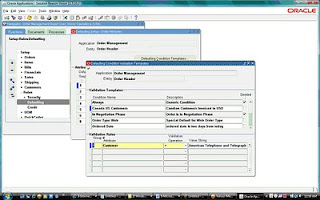
Put the Cursor on the attribute: Customer and click Defaulting Condition Template


Enter the Validation Temple Condition Name : CN USD Customers
Description : Canadian Customer Invoiced in USD
Enter the Validation Rules
Group#:1
Attribute: Customer
Validation Operation: =
Click Value String and enter the sold to customer (Note the customer#)
Defaulting Flex Field is displayed .
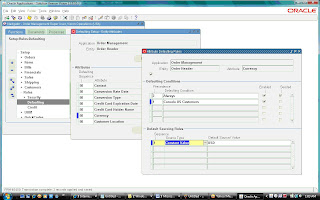
Put the Cursor on the attribute: Currency and click Attribute Defaulting Rule
Defaulting Condition:
Precedence:1
Defaulting Condition: Canada US Customers
Defaulting sourcing rule:
Sequence:1
Source Type: Constant Value
Default Source/Value: USD

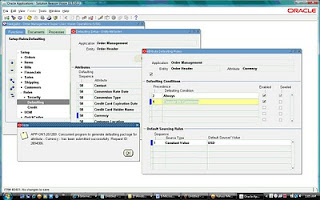
Save the form and run the Generate Defaulting handler Package (Tools > Generate Defaulting Handler Package) a note is displayed as given below and a Default Generator concurrent job is run.
.


you will get a message given below click OK


click OK you will get a note message given blow:

click OK


Create a Order of the customer default currency will CAN as soon you enter the customer# in the order form the currency changes to USD.

Sunday, January 31, 2010

Consolidation (GCS, HFM, FCH)

Consolidation:

Consolidation is the period–end process of combining the financial results of separate subsidiaries with the parent company to form a single, combined statement of financial results.

GCS is a multi-source consolidation solution that can accumulate information from diverse financial systems, geographic locations, including Oracle and non-Oracle Applications. With GCS one can consolidate data from multiple SOBs, multiple instances and non-Oracle applications.

With Oracle General Ledger, you can consolidate any number of subsidiaries into parents represented by different sets of books – even those with different Chart of accounts, Currencies and Calendars.

•Consolidation of companies within a Set of books.
•Consolidation of companies across multiple Sets of Books in the same instance.
•Consolidation of companies across multiple Sets of Books across multiple instances.
•Accounting for some companies is maintained in non-Oracle applications.

What you can Consolidate:

1) Chart of Accounts: Map any subsidiary chart of accounts structure into your consolidated parent,regardless of differences in the account structure.
2) Level of Detail: Consolidate detail transactions, detail balances, or summary balances.
Balance Type: Consolidate actual, average, translated, budget, and statistical balances.
3) Calendar: Use any accounting calendar for the parent set of books into which you consolidate your subsidiaries.
4) Currency: Maintain subsidiary sets of books in a different currency than your parent. Simply revalue and translate balances as needed before transferring consolidation data to your parent.

GL Consolidation Steps:

1.Create Consolidation mapping: parent and subsidiary sets of books.
2.Post all Journals in subsidiary set of books.
3.Revalue foreign currency balances in subsidiary sets of books.
4.Translate subsidiary balances to the functional currency of parent set of books
5.Run and review trial balance report.
6.Transfer data from subsidiary to parent.
7.Run Journal import.
8.Post the consolidation journal in parent set of books.
9.Eliminate intercompany balances.
10.Run trial balance and other financial reports.

Steps to perform consolidation:

1.Map Consolidation Data.
2.Prepare Consolidation Data.
3.Transfer Consolidation Data.
4.Review and Post consolidation JE.
5.Generate and review eliminating Entries.
6.Report on Consolidated balances.
7.Analyze Consolidated Results.


Consolidation workbench:
The Consolidation Workbench provides a central point of control for consolidating an unlimited number of subsidiaries to your parent, while keeping you informed about each subsidiary’s consolidation status. The workbench also monitors subsidiary account balances for any changes that occur after the subsidiary data has already been transferred to your parent set of books.

Functional Step State Controller Buttons
Map Consolidation Data -- Mapping, Mapping Set
Prepare Subsidiary Data -- Translation Status
Transfer Consolidation Data --Transfer, Transfer Set
Post Consolidation Data -- Review Journal, Post
Eliminating Entries -- Eliminate, Elimination Set
Report on Consolidated Balances --Report


Consolidation Process:


1.Define Consolidation Charts of Accounts: Make sure your parent and subsidiary charts of accounts can help simplify the consolidation process.
2.Map Consolidation Data: The first step in an actual consolidation is to define how your subsidiary accounts map to your parent accounts. The mapping determines how your subsidiary balances roll up into the consolidated ledger.
3.Prepare Consolidation Data: You should revalue and translate any foreign currency amounts from your subsidiaries before consolidating them to the parent set of books.
4.Transfer Consolidation Data: Once your subsidiary data has been prepared, transfer it to the parent, where it will be consolidated.


Preparing Consolidation Data:

1.Revalue Balances: if any sets of books have balance sheet or income statement accounts denomination in a foreign currency.
2.Translate Balances: for any subsidiary books that use a functional currency that differs from the parent.
3.Run a trial balance: for each subsidiary set of books using the parent set of books functional currency.
4.Review: subsidiary balances before transferring them to the parent.

Foreign Currency Concept:
There are 3 Concepts in Oracle General Ledger that pertains to foreign Currency

Conversion: conversion refers to foreign currency transactions that are immediately converted at the time of entry to the functional currency of the set of books in which the transaction takes place.
Revaluation: Revaluation adjusts liability or asset accounts that may be understated or overstated at the end of a period due to a significant fluctuation in the exchange rate between the time the transaction was entered and the end of the period. It restates balances using proper period end rate.
Translation: Translation refers to the act of restating an entire set of books or balances for a company from the functional currency to a foreign currency.

Consolidation Methods
When the consolidation is run, consolidation journal entries are created in the parent set of books for all the subsidiaries selected.

•If you choose the Balances method, the resulting consolidation journal will include the account balances for all the subsidiaries that were run.
For example, if a subsidiary had five transactions that made up the balance of the sales account, the consolidation journal entry will include the balance of the sales account, and not the individual transactions (based on the mapping rules).

• If choose the Transactions method, the resulting consolidation journal will include the transactions for all the subsidiaries that were run.
For example, if a subsidiary had 5 transactions for the sales account, the consolidation journal entry will include each transaction.

When a Consolidation is run, Oracle General Ledger submits a Concurrent process that populates the GL_INTERFACE table with Consolidation data.


The table below lists all possible statuses for consolidation processes displayed in the status column.

Reports:
  • Use the FSG as the mechanism to sum up the subsidiaries to produce consolidated results in case of Single SOB.
  • In case of companies having multiple SOB / non-Oracle Application, use FSG to report on consolidated results.
  • Use the ADI to extend reporting to the spreadsheet environment. ADI allows to create and publish consolidated reports in HTML format to the Internet or corporate intranet.
  • Run a Trial Balance Report for each subsidiary after revaluation and translation.
  • Consolidation Rules Report.
  • Consolidation Unmapped Subsidiary Report
  • Disabled Parent Accounts Report.
  • Consolidation Rules Report.
  • Consolidation Journals Report.
  • Consolidation Audit Report.
  • FSG reports.
Oracle Hyperion Financial Management (HFM) is a financial consolidation and reporting application built with advanced Web technology, but used and maintained by the finance team. It provides financial managers the ability to rapidly close and report financial results, meet global regulatory requirements, reduce the cost of compliance and deliver confidence in the numbers.

Features:

•Simple to Customize
•Easy to Integrate
•Financial Data Quality
•Complete Audit Trails
•Flexible Workflow
•Powerful Reporting
•Finance owned & operated

Benefits:

•Confidence in the numbers
•Reduce cycle time
•Automate collection & validation
•Lower cost of compliance
•Speed and agility


Oracle Financial Consolidation Hub: (OFCH/FCH)
Oracle Financial Consolidation Hub is a key component of Oracle Corporate Performance Management, a comprehensive solution for improving performance across your business

OFCH is
•A comprehensive consolidation and reporting solution that brings together financial data from different sources to create a single, global view of financial information across the entire enterprise.
•A critical bridge between traditional financial applications and analytic applications by using Enterprise Planning and Budgeting

FCH Features:

  • Data collection from different sources
  • Automated consolidation processing
  • Flexible eliminations and calculations
  • Acquisition and disposal handling
  • Multi-dimensional reporting and analysis
  • Consolidation dashboard
FCH Big Picture:


Source: My OracleSupport

Saturday, December 26, 2009

Accounting Method Builder (AMB) ,Event Classes and Event Types

Subledger Accounting is a new set of tools, accounting engines and repsoitory. Accounting Method Builder is a part of Subleger accounting.

Accounting Methods Builder:
  • Toolset to define Journal Entry rules for the transactions and events of a subledger application.
  • Allows defining multiple sets of rules to be used concurrently for different requirements.

How Accounting Methods Builder works Journals are split into three main components:
1.Description
2.Line Types
3. Account Derivation Rules.

Event:
Subledger Accounting introduces the concept of events for the transactions. An event is the recording of a change of status in the transaction life cycle (for example, an invoice has been approved, a payment has been cancelled, a period has been closed, etc.). This is a fundamental component of the design to allow a clear separation between transactions and their accounting representations.Since events are the bridge between the transactions and the journal entries.


Event Model: Definition of the subledger transactions types and lifecyle.
Event Class: Classifies transaction types for accounting rule purposes.

Payables - Invoice, Debit Memo, Prepayment, Payments, Refunds.


Receivables - Invoice, Deposit, Receipt and Bill Receivables.

Purchasing - Requistion, Purchase Order.

Event Type: Accounting event types represent the business operations that can be performed on the event class. An accounting event always has an associated event type.

For each transaction type, defines possible actions with accounting singnificance.

- Payables Invoice - Validated, Adjusted, Cancelled.


-Receipt - Created, Applied , Unapplied , Updated , Reversed. Adjusted.


-Purchase Order - Created, Distributed, Cancelled, Rejected, Finally Completed.

Oracle Subledger Accounting introduces a new Subledger Accounting Rules Detail Listing Report to provide detailed information about accounting rules defined for a subledger accounting method. The report can be submitted from the individual subledger applications or from Oracle General Ledger.
In addition, the report can be submitted for custom applications registered within Oracle Financial Accounting Hub.Users can now use the new report to easily review the following setup details:
• Subledger Accounting Method
• Journal Line Definition
• Journal Line Type
• Account Derivation Rule
• Journal Header Description
• Journal Line Description.

Tuesday, December 22, 2009

R12.1.X New Features

Ledger Architecture
- Ledgers: Define by Chart of Accounts, Calendars, Currency and Accounting Conventions.
- Ledger Sets: Group of Ledgers sharing the Same Chart of Accounts and Currency.

Centralized and Flexible Rules based Accounting Engine
- Ruled based engine with configurable accounting rules
- Single source of truth for accounting, reconciliation and reporting with common data model and repository and posting engine.
- Consistent data model and user interface across all subledgers.

Centralized Legal Entity Management
- Manage Legal Corporate Structure
- Link tax, intercompany, bank account and accounting functions
- Isolate legal compliance issues at legal entity from the management and security issues at operating Unit.

Centralized Banking and Payments
-Single user interface for all setup and maintenance related to banks and internal bank accounts.
-Centralized management of all funds capture and disbursements
-Centralized credit card management.

Centralized Global Tax Processing
-Centralized Tax Engine with single data model for rules and transations across geographes and applications
-Centralized tax repository for global visibility
-Simplified tax configuration across legal entities and oracle apps.

Advanced Global Intercompany system
- Centralized intercompany and intracompany accounts setup
- Fully configurable approval rules and invoicing options.
- Physical Payables and Receivables intercompany invoice generation.

Oracle General Ledger:

- Single Page for all accounting setup with Accounting Setup Manager.
- Prevent Accounting errors with Alternate accounts
-Replacement for Disabled Accounts
-Prevent unauthrized posting with Control Accounts
-Simplify security and Data Access and Definition Access sets.
-Sequential numbering of accounting entries
-Journal line reconciliation-Journal Batch Copy
-Historical Data initialization for new reporting currencies and secondary ledgers.

Oracle Payables:

- Pay on behalf of a different party with 3rd party payments
- Greater flexibility in defining and calculating discounts for quick payments.
-Application of withholding taxes at time of invoice validation and during payment
-Improved resolution for dispute processing with suppliers.
-Imporve invoice data entry and management with line level entry, approval, matching and tax calculation.
-Automated netting of Customer and Supplier balance
-Self-Service invoivce allows employees and suppliers to enter various invoice type online.
-New interface and data model for supplier managment in TCA.


Oracle Receivables:
-Streamlined receipt porcessing with cash application work queue.
-Enhanced performance for high volume receivables processing.
-Synchronize Cost of Goods Sold(COGS) with Revenue.
-Increased efficiency with line level cash application.
-Improved billing communcation with balance forward billing.
-Create standard late charge polices that can be assigned to customer accounts or account sites.

Oracle Advanced Collections:
- Assign bankruptcy status at the customer level
- Effetively manage later stage delinquency status assignment at case and contract level.
- Internal only comment visibility for dispute processing.
- Streamline system setup and operational maintenance with implementation checklist.
-Consolidation of collections features provides collections workbench
-Improved ability to collect with enhanced dispute management.

Oracle Assets:
- Flexible accounting configuration
- Automated depreciation rollback for selected assets
- Enhanced mass additions interface for legacy conversions
- Unplanned depreciation(impairments) for energy industry
- Unit of production and straight line depreciation methods for O&G industry.
- Flexible reporting with BI Publisher.

Source: My Oracle support

Monday, December 21, 2009

Auto Invoice Performance Improvement

Setup Considerations for Performance:
===============================
System Options Setup
-Log File Message Level-Message Level 0 shows the following in the log file:
  • Product Name & Version
  • AutoInvoice Start Time, End Time, & Logical Steps
  • AutoInvoice Concurrent Request Arguments
  • Error and Warning Messages
-Message Level 1 shows time stamped function labels plus all of the above.
-Message Level 2 shows above entries plus:
  • Sizes of Allocated Arrays ,Dynamic SQL Statements , Number of Rows Updated, Inserted and Deleted
-Message Level 3 shows above plus Method IV SQL Array Values

Scenarios: You have number of transactions in the AR Interface table which are ready to get invoiced for the source order Management, you have run the auto invoice program and the process is taking long time to complete e.g more then 6 hrs for 3000 lines . What do you do and how do you improve the performance of the Auto invoice program.

To increase performance during the validation portion of AutoInvoice:

NOTE: You may want to back up this table before truncating if you need to review prior errors. Errors will be re-submitted into this table from any unprocessed invoice lines

  1. Ensure that all indexes for the transaction flexfield are set up i.e indexes should be created on Transaction Flexfield columns.

  2. Unique, concatenated indexes should be created on the following tables and columns:
  • RA_CUSTOMER_TRX_ALL
  • RA_CUSTOMER_TRX_LINES_ALL
  • RA_INTERFACE_LINES_ALL
  • RA_INTERFACE_DISTRIBUTIONS_ALL
  • RA_INTERFACE_SALESCREDITS_ALL
  • OE_ORDER_LINES_ALL

1.Truncate the table RA_INTERFACE_ERRORS_ALL.

sql> connect AR/AR

sql> truncate table RA_INTERFACE_ERRORS_ALL;

2. If your Line Transaction Flexfield is ORDER ENTRY. You need to create indexes for ALL columns used in the Line Transaction Flexfield.

First, drop existing custom indexes if you have any:

sql> drop index XXX_RA_CUSTOMER_TRX_LINES_A1;

sql> drop index XXX_RA_INTERFACE_LINES_A2;

Second, create the following indexes:

NOTE:You can use CREATE INDEX instead of CREATE UNIQUEINDEX if necessary.

SQL> CONNECT AR/AR

SQL> CREATE UNIQUE INDEX XX_RA_CUST_TRX_U1 ON RA_CUSTOMER_TRX_ALL (INTERFACE_HEADER_CONTEXT, INTERFACE_HEADER_ATTRIBUTE1, INTERFACE_HEADER_ATTRIBUTE2, INTERFACE_HEADER_ATTRIBUTE3, INTERFACE_HEADER_ATTRIBUTE4, INTERFACE_HEADER_ATTRIBUTE5, INTERFACE_HEADER_ATTRIBUTE6, INTERFACE_HEADER_ATTRIBUTE7, INTERFACE_HEADER_ATTRIBUTE8, INTERFACE_HEADER_ATTRIBUTE9, INTERFACE_HEADER_ATTRIBUTE10, INTERFACE_HEADER_ATTRIBUTE11, INTERFACE_HEADER_ATTRIBUTE12, INTERFACE_HEADER_ATTRIBUTE13, INTERFACE_HEADER_ATTRIBUTE14, INTERFACE_HEADER_ATTRIBUTE15);

SQL> CREATE UNIQUE INDEX XXX_RA_CUST_TRX_LINES_U1 ON RA_CUSTOMER_TRX_LINES_ALL (INTERFACE_LINE_CONTEXT, INTERFACE_LINE_ATTRIBUTE1, INTERFACE_LINE_ATTRIBUTE2, INTERFACE_LINE_ATTRIBUTE3, INTERFACE_LINE_ATTRIBUTE4, INTERFACE_LINE_ATTRIBUTE5, INTERFACE_LINE_ATTRIBUTE6, INTERFACE_LINE_ATTRIBUTE7, INTERFACE_LINE_ATTRIBUTE8, INTERFACE_LINE_ATTRIBUTE9, INTERFACE_LINE_ATTRIBUTE10, INTERFACE_LINE_ATTRIBUTE11, INTERFACE_LINE_ATTRIBUTE12, INTERFACE_LINE_ATTRIBUTE13, INTERFACE_LINE_ATTRIBUTE14, INTERFACE_LINE_ATTRIBUTE15);

SQL> CREATE UNIQUE INDEX XXX_RA_INT_LINES_U1 ON RA_INTERFACE_LINES_ALL (INTERFACE_LINE_CONTEXT, INTERFACE_LINE_ATTRIBUTE1, INTERFACE_LINE_ATTRIBUTE2, INTERFACE_LINE_ATTRIBUTE3, INTERFACE_LINE_ATTRIBUTE4, INTERFACE_LINE_ATTRIBUTE5, INTERFACE_LINE_ATTRIBUTE6, INTERFACE_LINE_ATTRIBUTE7, INTERFACE_LINE_ATTRIBUTE8, INTERFACE_LINE_ATTRIBUTE9, INTERFACE_LINE_ATTRIBUTE10, INTERFACE_LINE_ATTRIBUTE11, INTERFACE_LINE_ATTRIBUTE12, INTERFACE_LINE_ATTRIBUTE13, INTERFACE_LINE_ATTRIBUTE14, INTERFACE_LINE_ATTRIBUTE15);

SQL> CREATE UNIQUE INDEX XXX_RA_INT_DIST_U1 ON RA_INTERFACE_DISTRIBUTIONS_ALL (INTERFACE_LINE_CONTEXT, INTERFACE_LINE_ATTRIBUTE1, INTERFACE_LINE_ATTRIBUTE2, INTERFACE_LINE_ATTRIBUTE3, INTERFACE_LINE_ATTRIBUTE4, INTERFACE_LINE_ATTRIBUTE5, INTERFACE_LINE_ATTRIBUTE6, INTERFACE_LINE_ATTRIBUTE7, INTERFACE_LINE_ATTRIBUTE8, INTERFACE_LINE_ATTRIBUTE9, INTERFACE_LINE_ATTRIBUTE10, INTERFACE_LINE_ATTRIBUTE11, INTERFACE_LINE_ATTRIBUTE12, INTERFACE_LINE_ATTRIBUTE13, INTERFACE_LINE_ATTRIBUTE14, INTERFACE_LINE_ATTRIBUTE15);

SQL> CREATE UNIQUE INDEX XXX_RA_INT_SALESCREDITS_U1 ON RA_INTERFACE_SALESCREDITS_ALL (INTERFACE_LINE_CONTEXT, INTERFACE_LINE_ATTRIBUTE1, INTERFACE_LINE_ATTRIBUTE2, INTERFACE_LINE_ATTRIBUTE3, INTERFACE_LINE_ATTRIBUTE4, INTERFACE_LINE_ATTRIBUTE5, INTERFACE_LINE_ATTRIBUTE6, INTERFACE_LINE_ATTRIBUTE7, INTERFACE_LINE_ATTRIBUTE8, INTERFACE_LINE_ATTRIBUTE9, INTERFACE_LINE_ATTRIBUTE10, INTERFACE_LINE_ATTRIBUTE11, INTERFACE_LINE_ATTRIBUTE12, INTERFACE_LINE_ATTRIBUTE13, INTERFACE_LINE_ATTRIBUTE14, INTERFACE_LINE_ATTRIBUTE15);

Note: You only need to create the following indexes, if these tables are being populated with interface data. If you are not using sales credits or accounting distributions, then you do not need to create these indexes

SQL > create index ONT.OE_ORDER_LINES_A1 on ONT.OE_ORDER_LINES_ALL (to_char(line_id)) tablespace APPS_TS_TX_IDX;

3. Set the Log File Message Level = 1 Navigate to Setup > System > System Options and set this value = 1.

4. Set the Profile option AR:Maximum lines per AutoInvoice worker : 1000 (At Site level). Please set this to a value that approximates an even distribution of invoices lines per worker. For example if each invoice has approximately 800 to 1000+ lines and you process 5 invoices per Autoinvoice run (approximately 5000 invoice lines) you could set the value of this profile to 1000 which should distribute 1 invoice (800 to 1000+ lines) per worker, if you run with 5 workers. If you are unsure of the distribution, do NOT set this profile.

Note:

  1. AutoInvoice inserts data into the tables, but never changes the data that is fed into the tables.
  2. Review the RA_INTERFACE_ERRORS table for details on what is failing during import. Use this information to quickly search for known issues.
  3. Review the Invalid Objects and Disabled Trigger Section to confirm correct setup.
  4. Run Gather Schema Statistics from the SYSADMIN responsibility

5. If you do NOT see a performance gain after making these changes, Please raise an SR with Oracle Support and upload the log files and execution report from a run of Autoinvoice and the Auto invoice diagnostics script.

6. SQL Query to check the time taken to complete by Autoinvoice import prgram.

SELECT request_id, TO_CHAR(request_date,'DD-MON-YYYY') "Date", RPAD(user_concurrent_program_name,60) "Program Name", RPAD(argument_text,20) "Arg", RPAD(TO_CHAR(a.ACTUAL_START_DATE, 'hh24:mi:ss'),10) "Start", RPAD(TO_CHAR(a.ACTUAL_COMPLETION_DATE, 'hh24:mi:ss'),10) "End", RPAD(TO_CHAR( (TRUNC(SYSDATE) + ( a.ACTUAL_COMPLETION_DATE - a.ACTUAL_START_DATE)), 'hh24:mi:ss'),10) "Actual", c.user_name, status_code "S"FROM applsys.fnd_concurrent_requests a, applsys.fnd_concurrent_programs_tl b, apps.fnd_user cWHERE b.user_concurrent_program_name like 'Autoinvoice Import Program' AND a.concurrent_program_id = b.concurrent_program_id AND a.request_date >= 'DD-MON-YYYY' AND a.requested_by = c.user_idORDER BY request_id desc;

Note : 197213.1-Autoinvoice Performance Is Slow. Note:169935.1 - Troubleshooting Oracle ERP Apps Performance Issues.

Source: My OracleSupport

Sunday, December 13, 2009

Oracle Application Patch Types

Standalone (one-off) Patch:
Addresses a single fix or enhancement. Standalone patches are released only when there is an immediate need for a fix or enhancement that cannot wait until an aggregate bundling is available.The One-off patch category was common in the older versions R11 (11.0.x) and early releases of 11i. Typically, they fix single or isolated set of bugs.

Rollup Patch (RUP):
An aggregation of patches that may be at the functional level, or at a specific product/family release level. Roll-up patches are a special kind that started to become more common as 11i matured. They are collection of bugfixes for a specific product and relate to specific patchset level.

For example, a Receivables rollup patch contains all the latest patches related to Receivables at the time the patch was created. A Marketing Family 11.5.10 rollup patch contains all the latest Marketing patches released since, and applicable to, 11.5.10.

Product Patch sets /Minipack:
An aggregation of patches at the product level.Standalone patchsets were common in early releases of 11i. They can enhance functionality and typically fix a large number of bugs for a single product. Once a patchset is applied, it increments the patchset level of a product (the product is sometimes also referred to as module). There are around 250+ products integrated in EBS, and each product has specific patchset level. Minipacks are named in alphabetical sequence such as 11i.AR.M, 11i.AR.N 11i.AR.O, and so on.

Family Pack:
An aggregation of patches at the product family level. For example, Financials Family Pack G(11i.FIN_PF.G) contains all the latest patches for products in the Financials family at the time the family pack was created. Family product codes always end in "_PF" and family packs are given alphabetical sequence such as 11i.FIN_PF.E, 11i.FIN_PF.F and 11i.FIN_PF.G. Family packs are cumulative. Family packs are seta of product patchsets for a particular family (Financials, SCM, Project Suite, and so on). The family pack’s advantage is that the patchset levels were tested together, and should therefore be more stable.

Release Update Packs (R12) /Maintenance Pack:
An aggregation of patches for all products in the E-Business Suite. For example, Release 11.5.10 Maintenance Pack contains all the latest code level for all products at the time 11.5.10 was created. Maintenance packs are numbered sequentially such as 11.5.8, 11.5.9, 11.5.10, and are cumulative. In other words, 11.5.10 contains everything in 11.5.9, which contains everything in 11.5.8, and so on. Maintenance packs deliver a new version of a product. Unlike major release upgrades, maintenance packs change the release number, which is the third number in a version name (for 11i). They are still considered patches, but the changes they introduce are system-wide. Often they also bring in brand new products.

Diagnostic Patch:
Used to gather additional information when a product failure cannot be reproduced by Oracle. The additional information assists Oracle Support Services and Oracle Development in resolving the failure.

Interoperability Patch:
Allows Oracle Applications to function properly with a newer version of the technology stack. Interoperability patches are typically required with new versions of the database or Applications technology stack.

Translated Patch:
A non-English version of a patch. Release 11i supports 30 non-English languages. Customers who are using languages other than English, need to apply the corresponding translated patch(es) for the languages they are using in addition to any base US patch(es).

Merged Translation Patch:
Provided in real time (without requiring a translator) in the event a translated patch is not available when a customer needs it. A merged translation patch is applied just like a fully translated patch. The fully translated patch is escalated and is usually available within 24 hours. It can be applied safely on top of a merged translation patch.

Translation Fix:
Provided in the event a translation word choice is inappropriate. A translation fix is applied just like a translated patch, except there is no corresponding base US patch.

New Feature Patch:
Introduces new functionality and/or products. It is applied using standard patching utilities.

Consolidated Update (CU):
Improves and streamlines the upgrade and maintenance processes by consolidating certain post-release patches. Most recommended patches and rollups for a particular maintenance release are consolidated into a single patch that is installed immediately following application of a maintenance pack or a new installation of Rapid Install. Updates in the CU are predominantly error corrections.

Family Consolidated Upgrade Patch:
Consolidates all upgrade-related patches from all the products within a product family. Family consolidated upgrade patches are released as needed and are applicable only if you are upgrading to Oracle is now introducing a new method for patching, patch set updates, or PSU. According to Metalink notes 854428.1 and 850471.1, An Oracle PSU contains recommended bug fixes and "proactive" cumulative patches, a nice change that makes it simple for the DBA to chose to apply "priority" patches. Starting each quarter, Oracle Cumulative Patch Updates (CPU) will now contain both the PSU and CPU, so the DBA may choose to apply a whole CPU or only the selected patches in the PSU patch bundle.The naming conventions for CPU and PSU is the last-order digit, so it's easy to see of you are patching with CPU or PSU


The PSU supports Oracle's zero-downtime patching, a method for RAC databases whereby each node is patched independently with no downtime.

R12 Changes:

R12 introduces some new terms, codeline and codelevel and changes the meaning of several established terms.

Codeline:

This refers to a point release. Every codeline delivers a unique set of features. So release 12.0 is a understood as codeline A; release 12.1 is understood as codeline B; release 12.2 will be understood as codeline C, and so on.

Codelevel:

Codelevel can resemble patchset level from 11i. For each codeline, there can be a set of updates, which deliver mostly bugfixes and reflects the particular product codelevel after the codeline letter.

Example R12.AR.A.6 means Account Payables product on codeline A (Release 12.0) on codelevel 6 (Part of release 12.0.6).

The important thing to understand is that if you install a specific R12 release such as 12.0.6, all products will not only be on the same codeline (A), but also on the same codelevel (6). The codelevel is incremented via Release Update Packs

Recommended Patch List(RPL):

The Recommended Patch List (RPL) is a tool available via My Oracle Support (formerly called MetaLink), which provides a list of recommended patches pertaining to a selected Family Pack for all the EBS product families. The RPL is available for both 11i and R12 code lines.

The tool is been updated regularly in MySupport/Metalink by EBS development. The well-maintained data in the RPL helps you to easily identify the required patches for the patch set level. As the tool is being standardized across EBS product family, the HRMS patch information is also updated for 11i (FP.K Rup 1, 2 & 3) and R12 code lines. You can now use all the features of the RPL tool


Advantages of applying CPCs over one-off fixes and RUPs are as follows:


  • CPCs are fully quality assured against current RUP levels. Individual one-off patches are not.
  • CPCs are consolidated and only contain critical patches that apply to broad customer usages. They are smaller in footprint and therefore much easier to apply and uptake than RUPs.
  • CPC Readmes have detailed business and functional information about the fixes included. Customers can leverage the Readmes to determine impact and testing required for specific process flows and software components involved.

Important points:

  • One-off patches, the 7-digit number is their only identifier.
  • The Patchset level naming convention has an alternative to the patch number for easier identification. It consists of version number, product abbreviation, and a letter.
  • 11i.AR.N refers to patchset N for product AR for version 11i and it can be found under patch number 9054532 (7 Digit Number)
  • Family packs add an additional component to the short name which is “_PF” after the product name abbreviation. For example: the Financails family pack is referred to as 11.FIN_PF.G
  • Consolidated updates were introduced after release 11.5.10. They append another number after the version number. So consolidated update 2 is referred to as 11.5.10.2 or simply CU2 .
  • Maintenance packs and their alternative names are same as the version number, so it’s 11.5.9, 11.5.10 etc.
  • R12.AR.A.6 means Account Receivables product on codeline A (Release 12.0) on codelevel 6 (Part of release 12.0.6).
  • RUP5 is equivalent to R12.0.5, RUP6 is equivalent to R12.0.6 etc.

Short names and their meaning:

  • CPC: Critical Patch Collection
  • RUP: Release update Packs
  • RPL: Recommended Patch List
  • ARU: Automated Release Update
  • CP: Concurrent Processing
  • UPC: Upgrade Patch Collection
  • PSU:Patch Set Update

Source: Oracle MySupport