Monday, August 6, 2018

Oracle Cloud ERP –R13 Financials 18A & 18B New Features

Oracle Cloud Enterprise Resource Planning - Financials: 18 B New Features
Given below are few features.
Cloud General Ledger:

Configure Auditable Setup Attributes and View Audit Report:
 
You can Enable the audit of selected setup and configuration attributes and view the report to improve  control over important enterprise processes. Monitor access to the setup attributes that impact important business decisions and processes. Maintain a reliable enterprise transaction system that supports day-to-day business operations.

The following business setup objects are enabled for audit in General Ledger:

    Account Combinations
    Accounting Automation
    Allocations and Periodic Entries
    Accounting and Reporting Sequences
    Auto Post Criteria Sets
    Chart of Accounts Mapping
    Daily Conversion Types
    Encumbrance Types
    Encumbrance Carry Forward Rules
    Inter-company Processing Rules
    Journal Categories
    Journal Sources
    Journal Reconciliation Rules
    Journal Reversal Criteria Sets
    Ledgers
    Revaluations
    Suspense Accounts
Cloud Payable's:

Streamlined Payment Processing:
This features simplifies installments selection to ensure that selected installments are compatible with the internal bank account and the payment process profile specified on the payment process request. Excluding non matching installments during selection reduces rejections during later stages of the payment process request, which results in a streamlined payment process.

Cloud Expenses:

a) Disable Scan Option on Mobile Expenses

Using this feature now you can control the Scan option on cloud Expenses mobile application.

b) Itemization of meals expenses categories:
Capture breakdown of meal expenses such as tips by enabling itemization.


Cloud Receivables:

Flexible Routing and Approval of receivables credit request:
 

Using this feature now you can configure Oracle Business Rules to determine whether a credit request against a Receivables transaction requires a manual review to create a credit memo. The notification process informs users of any required actions. Users will also be able to capture additional information on the credit request or on subsequent workflow notifications.

 Oracle Cloud Enterprise Resource Planning - Financials: 18 A New Features

 Cloud General Ledger:
 

Accounting automation:
Accounting Automation streamlines and automates your end-to-end accounting and transaction processes,including Import Daily Rates, Create Accounting, Import Journals and Posting, greatly reducing manual work and time lags in your business operations. The data flows through all of the required processing steps with no user intervention, while making it easy to involve the right people at the right time to resolve exceptions. This ensures the continuous availability of the most accurate and up-to-date financial information. 


Cloud Payable's:

Invoice routing for account coding:
This features simplifies installments The Invoice Routing for Account Coding feature enables customers to route invoices to business users for entering accounting information. Invoices requiring accounting information are automatically routed to the designated users based on routing rules. With this feature, the Payables department can assign the responsibility of entering the accounting information to the appropriate business users. This feature enables customers to streamline the process of recording unmatched invoices and improve the overall efficiency of the Payables department.


The Capabilities covered using this feature are given below:

1. Ability to route non PO matched invoices to business user for entering accounting information. Generally, all unmatched invoices need the accounting information be entered to make it complete. The Payables clerk usually has to interact with multiple users to get this information and in most cases, the business users that have incurred the expenditure can provide the details. This feature enables customer to route invoices to appropriate users for providing this accounting information.
2. Invoices that are complete from a data entry perspective and requiring accounting information are automatically routed to the designated users based on assignment rules,
3. Based on the need, the users can perform manual initiation and user can perform additional action such as withdrawn and resubmit.
4. A new workflow task has been created to route invoices for account coding. This new workflow enables customer to define the assignment rules based the business needs.
5. All the standard workflow features such as reminder, escalation are available with this workflow. Assignment rule can be defined based on all invoice attributes.
6. Invoices assigned to users are notified by email and workflow notification.
7. User having the employee role can access this notification and provide the accounting information.


The Configurable Payables Email Notification feature is supported for Account coding workflow. 
By default, Configurable Payable Email Notification feature for Invoice Account Coding Notification is not enabled. You must go to Configurable Payable Email Notification feature, on the Opt in page under Financial Offering and enable the “Invoice Account Coding Notifications” option.


Invoice Action- Account Coding :


Invoice Account Coding Status:


for more new features go through the URL given below:
https://cloud.oracle.com/en_US/saas/readiness?offering=financials 

Reference: Oracle Cloud ERP


Friday, December 29, 2017

R13 Oracle Cloud ERP - Rapid Implementation


ERP Cloud is the market leader and continues to strengthen its position
• Most complete functional solutions to enable end to end business processes
• Has a broad global coverage with customers in 85 countries
• Delivers deep industry capabilities spanning dozens of industries
• Scales from midsize companies to the largest organizations in the world
ERP Cloud is innovative
•Delivering over 500 new features in past year, including new products like Revenue Management, Accounting Hub, XBRL Reporting, Advanced Financial Controls and Supply Chain
•Investing in emerging technologies to simplify finance operations
ERP Cloud is proven
•Over 4,200 customers with over 1,700 live
What is Rapid Implementation:
Rapid implementation is a way to configure a financial enterprise and financial reporting structures
quickly using sheets in a workbook.

    Includes a subset of tasks to enter the minimum amount of setup data required
Applies the 80/20 rule
Defaults the most common options
Hides complex and advanced set up
Advanced configurations can be added later where required
Applicable for quickly setting up Demos, Test envs., Conference Room Pilots, etc. because spreadsheets can be reused across environments


    Rapid Implementation Task List:


    Instructions worksheet:
    Contains overview and steps
    Recommendations and Best Practices
    Embedded sample spreadsheet with sample data


    The rapid implementation process for setting up the enterprise structure includes the following steps:
    1.    Downloading the Rapid Implementation for General Ledger workbook.
      2. Entering data into the sheets
      3. Verifying the entered data and resolving any errors
      4. Uploading the chart of accounts file.
      5. After successful upload of the chart of accounts file, uploading the general ledger, legal entity, and business unit file with the rest of the configuration.

      Benefits: 
      1. Reduced Implementation time
      2. Same spreadsheet can be used across environments
    R13 Global Capabilities:
      
      •Financials Cloud offers simplified user experience  and is optimized for various form factors especially for self-service type users and is very simple, easy to understand with modern user experience and is going to be the standard paradigm for all the user interfaces for tablets.

    •Social networking – all the social collaboration capabilities that been built in to the product is allowing the customers to collaborate on different kind of business activities much more effectively than ever before.

    •Everything is Analytics – all embedded analytics that we have, all the visualization we have, BI Mobile analytics, self service functions, the power of all analytics is embedded in the package.
    •Power of integrated platform. So one single integrated platform with HCM Cloud, Innovation Mgmt, PBCS, all allowing all these processes to work  in an integrated manner to complete the business processes.

    Saturday, September 2, 2017

    Oracle Financials Cloud Release 13 New Feature Summary

    1. Cloud Financials:

    1. Advanced Collections:

    1. Display On-Account and Unapplied Receipts in the Transactions View

    2. Assets:

    1. Alias Support for Key Flexfields in Assets
    2. Asset Leases
    3. Automatically Derive Depreciation Expense for Assets
    4. Payables Invoice Details During Asset Conversions
    5. Redesigned OTBI Subject Areas for Assets
    6. Spreadsheet-Based Mass Detail Changes for Assets


    1. Bill Management:

    1. Budgetary Control
    2. Budgetary Control Year-End Carry Forward
    3. Enhanced Budgetary Control Processing and Reporting
    4. Enhanced Attributes for Budget Control - Transactions Real Time Subject Area
    5. New Budgetary Control - Balances Real Time Subject Area
    6. Enhanced Attributes for Budgetary Control - Transactions Real Time Subject Area..

    1. Cash Management:

    1. Enhanced Bank Statement Handling and Reconciliation Features
    2. Extended Cash Forecasts
    3. Treasury Management Integration

    1. Expenses

    1. Improved Controls for Expedited Expense Reimbursement
    2. Mobile Expenses Enhancements
    3. Remittance Advice and Tokenization with Corporate Card Processing
    4. Enhanced Compliance with Entertainment Policies

    5. General Ledger
    6. Clearing Accounts Reconciliation
    7. Journal Posting Improvements
    8. General Ledger Reporting.

    1. Payables:

    1. Deferred Expenses
    2. Duplicate Invoice Check
    3. Supplier Balance Aging Report.

    4. Receivables:
    5. Ability to Settle Tokenized Credit Card Transactions from Third-Party System
    6. Ability to Unapply Standard Credit Memos from Invoices
    7. Credit Management
    8. E-Mail Delivery of Statements

    9. Subledger Accounting
    10. Subledger Reporting
    11. Usability Enhancements for Subledger Accounting - Journals Real Time Subject Area
    12. Export Accounting Entry View in Spreadsheet

    13. Tax
    14. Enhanced Support for Tax Partner Integration
    15. Tax Box Allocations`

      Friday, July 7, 2017

      Good News - The Future of Oracle e Business available at least to 2030......

      Oracle SVP EBS Product Development, has just released a new support timeline that announces Oracle's commitment to release subsequent versions to the Oracle E-Business  12.2 with premium support being available at least  to 2030. 
      Great news for e-Business customers who are interested in continuing to leverage their current e-Business  investment.

      In the meantime, while heavily investing in E-Business Suite particularly in 3 areas: Modern User Experience (UX), Functional Innovation, and Operational Efficiency Cliff Godwin gave us a hint about introducing at least 3 other E-Business Suite releases by the end of the decade.

      Oracle EBS Suite R12.2.6 Road Map and New Features:


      Oracle E-Business Suite’s roadmap shows that Oracle is still committed to continuing on the R12 series of releases. A projected timeline shows release 12.2.7 is coming at an indefinite date, with release 12.3.


      ORACLE EBS 12.2.6 Delivers to Strategic Investments in EBS Products

      Cliff Godwin, SVP of Application Development, said that Oracle continues to invest in 3 main areas of focus throughout 12.2: functional innovation, user experience, and operational efficiency.

      Functional flows for modern business in integrated global suite
      - The subscription economy
      - Outcome Driven procurement
      - Customer driven enhancements

      Modern user experience and Mobility: Simple and actionable user experience for operational roles
      - User experience convergence
      - Smartphone applications
      - EBS Information Discovery.

      Oracle E-Business Suite 12.2.6 continues an ongoing pattern of user experience modernization that emphasizes simplified layouts, tablet optimization, and consistency with Oracle Cloud products. Key advances include:

      More Tablet-Optimized User Interfaces: Additional tablet-optimized UIs are provided in functional areas where users have a high mobility requirement, including shipping, receiving, and reservations.

      More HTML User Interfaces: HTML alternatives to several existing Forms interfaces offer simpler layouts and more modern user interactions. Examples include the Update Assets UI in Enterprise Asset Management, and AOL setup UIs for Users, Responsibilities, and Flexfields.
      Enhanced Information Discovery Applications:

      Operational Efficiency Lower effort and cost to operate and optimize EBS system.
      -online patching
      - Application management
      - Automated Testing.

      Oracle Receivables:

      Multiple Tax Rates in One VAT Invoice:
      Golden Tax Adaptor now allows multiple tax rates in one VAT invoice. VAT invoices with multiple tax rates no longer need to be split by tax rate

      Support for Tax-Inclusive and Tax-Exclusive Business Cases:

      Golden Tax Adaptor now supports both tax-inclusive and tax-exclusive business cases. The Invoice Export flat file has been modified to support the Aisino Golden Tax System calculation of tax and invoice amounts for tax-inclusive and tax-exclusive business cases.


      Oracle iReceivables:
      End Date Bank Account without Payment Processing: 
      -Customers now have the ability to end date bank accounts without processing a payment against that account, and without restricting end dates to a future date.
      -Users can mange Credit Cards and Bank Accounts at Account or Site levels without an Invoice or processing the payment flow

      Oracle Advanced Collections:

      Collect on Related Accounts
      -Customers require the ability to assign collectors at multiple collection levels, enabling them to run scoring and strategies at Customer, Account, and Bill- To levels.
      -Customers now group parties with parent and child relationships to score, assign and manage strategies, assign collectors, and view aggregate information on related accounts. Strategy Actionable Work Items.
      -Strategy Actionable Work Item template rules are now available to allow users to execute work items based on the percentage amount collected. When the user or system completes the work item, post-wait, based on the amount received and associated rule definition, the system will skip or continue the next work item in the strategy. Additionally, Strategy Templates and Work Item Templates can be defined for a specific Operating Unit.

      CHRM:
      Period Management, Enhancements in AutoPay
        Oracle Financials Information Discovery (Endeca):

        -Oracle Financials Information Discovery for Oracle Assets has been enhanced to include two new pages, namely ‘Asset Reconciliation’ and ‘Sub-ledger Additions Pipeline’.
        -In the Account Reconciliation page you can view account balance reconciliations and quickly identify any discrepancies between sub-ledger accounting balances for Oracle Assets and Oracle General Ledger balances for asset cost, CIP cost, asset clearing, CIP clearing account, and Accumulated Depreciation.
        -The Sub-ledger Additions Pipeline page enables you to get an early estimate of any transactions in Oracle Payables and Oracle Projects, which are tracked as assets but not yet transferred to Oracle Assets, to assess the significance to your asset base
        -In addition to the original full asset load into Oracle Financials Information Discovery tables, further capability has been added to enable you to load mass transactions incrementally into Oracle Financials Information Discovery.

        -Oracle E-Business Suite Information Discovery applications include more product content and enhancements, enabling users to identify and act on high-priority transactions without custom operational reporting. New capabilities include a 360-degree order view in Order Management, asset reconciliation with GL in Financials, and Boolean search support in Installed Base.
          Order Management
          -Order Management: Recurring Billing

          -Quoting: Document Approvals using Electronic Signatures

          Logistics
          -WMS: Inbound Task Management & Interleaving
          -Invoice: Material Classification
          -Yard: Distributed Yard
            Procurement
            -iProcurement: Spot Buy, Preferred Items
            -Contract Relationships
            -PCC: Sourcing
            -Project Procurement: Revisions
            -Oracle Procurement Command Center provides an enhanced view of supplier performance that includes employee reviews from Oracle iProcurement and supplier evaluations from Oracle Supplier Lifecycle Management.
            -.Oracle Project Procurement Command Center better aligns project and procurement teams with visibility to line-level changes to procurement plans. Oracle iProcurement now supports a spot buying process that lets privileged requestors create certain purchase orders without involving the procurement team. Procurement buyers can influence search relevance rankings in Oracle iProcurement Information Discovery to guide end users to preferred items and suppliers. Oracle Procurement Contracts delivers a complete view of linkages between procurement documents and contracts.
              Projects
              -Accounting Adjustment Options
              -SOV & ARR Effort Coefficient
              -Consolidated Invoice UI
                Manufacturing
                -Process Manufacturing: Yield Management
                -Project Manufacturing: LCM Support
                -MES: Serialized Manufacturing Enhancements
                  Value Chain Planning
                  -Inventory Policy Planning
                  -Enhanced UIs
                    Asset Management
                    -Linear Assets Enhancement WO Creation
                    -Calendar Based Preventive Maintenance
                    -WO Package Printing
                      Service
                      -Multiple Products on SR
                      -Task Status by Task Type
                      -GPS Based Emergency Scheduling
                      -Depot: Claims
                        Human Capital Management
                        -Pay: Enhanced Retropay Analysis
                        -OTL: Overtime as Absence Accrual, Calendar UI
                          for more information please go through the below link.


                          Saturday, February 25, 2017

                          Overview of Oracle Cloud/Fusion Application.

                          Oracle E-Business Suite and Oracle Cloud Applications are two different Enterprise Resource Solutions (ERP) provided by Oracle to ease your day to day business processes and there will always be a confusion whether to choose Oracle E-Business Suite Applications or Oracle Cloud Applications. Before finding out difference between Oracle E-business Suite and Oracle Cloud first have a brief overview about both these Oracle  ERP.

                          Oracle’s E-Business Suite (EBS) is the on-premise traditional solution for Oracle ERP.  It consists of a collection of modules, all integrated into one suite. When we use the term ‘Oracle EBS,’ assume it to be on-premise unless otherwise noted.

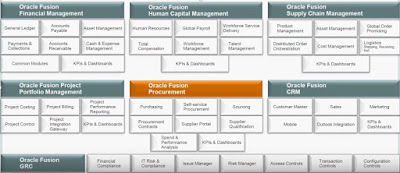
                          Oracle Cloud/Fusion Applications is a suite of next generation enterprise solutions developed by Oracle Corporation. It provides services in financial management, human capital management, customer relationship management, supply chain management, procurement, project portfolio management etc. Cloud/Fusion Applications is a best of the breed combination of features and functionalities taken from Oracle E-Business Suite, JD Edwards, PeopleSoft and Siebel product lines. The suite is built on the top of the Oracle Fusion Middleware technology stack. It is based on Service Oriented Architecture (SOA).


                          Oracle Cloud Approach:
                          Oracle’s recommended cloud approach depends on the customer and their existing state

                          ERP CLOUD (SAAS) Approach  - If you don’t have a current on-premise Oracle EBS implementation and you are more of an small or medium size business(SMB), then Oracle recommends that you go directly to ERP cloud.

                          Co-existing  Approach - If you are an enterprise with an on-premise Oracle EBS implementation, Oracle recommends that you go with the coexistence approach. Keep your existing Oracle EBS on-premise.
                          The cloud ERP is not mature enough yet and cannot support complex and heavily customized business processes. Second, Oracle is acknowledging the heavy investments customers have
                          made on their existing EBS.

                          However, there are two main scenarios on which Oracle does recommend existing customers to start implementing cloud applications: scenarios on which Oracle does recommend existing customers to start implementing cloud applications

                          If you have a new subsidiary , Oracle recommends that instead of implementing another EBS instance, you implement the system on the Oracle ERP Cloud and then integrate them into your headquarters EBS, which is on-premise.

                          If you want to implement new modules or re-implement modules, such as HCM, Sales or Marketing, Projects Suite Oracle recommends that you do so on their cloud and integrate them to your core on-premise EBS (e.g. Finance & Logistics).


                          Ø  Dashboards and work areas put information in one place
                          Ø  Spreadsheet integrations
                          Ø  Transaction processing
                          Ø  Mobile
                          Ø  Management and reporting
                          Ø  Setup for fast, simple implementation
                          Oracle Cloud Financial Management


                          Breadth and Depth:


                          Oracle Cloud/Fusion Procurement Management:


                          Oracle Cloud Inventory Management:


                          Oracle Fusion/Cloud  is known as Oracle Cloud Application which is next generation suite of software application which is distributed across various groups, which includes a broad range of Cloud/fusion application modules like Enterprise Resource Planning, Oracle Cloud Procurement, Supply Chain Management, Customer Relationship Management, Human Capital Management, Cloud Financials, Governance, Risk and Compliance.
                          Enterprise Resource Planning: Enterprise Resource Planning is also referred as ERP, which is an industry term for the wide range of actions that helps a firm to handle their financial business. The main goal of enterprise resource planning is to assist the flow of information so that business decisions can be data-driven. The software suites are designed to collect and administrate data from various levels of industries to offer management with insight into key act indicators in real-time.

                          Supply Chain Management: Supply Chain Management is known as SCM, it is the failure to notice of resources, data, and finance as they flow in a process from supplier to the manufacturer to wholesaler to retailer to buyer. It involves coordinating and integrating cycle flows among companies. It is said that the final goal of any effective supply chain management system is to lower the breakdowns.

                          Oracle Cloud/Fusion Procurement: Fusion Procurement is a system code which allows an organization to automate the processes of purchasing goods and maintaining an inventory of goods or services. Procurement can generate requisition, approval, purchase orders, goods receipt note, execute the ordering process online, invoice creation to products received, and pay all bills in online.

                          Human Capital Management: Human Capital Management is known as HCM, it is an approach to employee staffing that perceives people as human capital assets whose current value can be evaluated and next generation value can be improved through investment.

                          Customer Relationship Management: Customer Relationship Management is a term which refers to practices, technologies, and strategies that an organization used to manage and analyze user interactions and data throughout the consumer lifecycle, with the aim of increasing business relationships with end-users, assisting in user maintenance and driving sales growth. It is intended to gather information on customers across many different channels of contact between the seller and the buyer who includes the company’s fax, website, phone, live chat, email, social media, and marketing materials. It provides buyer facing staff detailed information on customer’s personal information, purchase history, buying preferences.

                          Oracle Cloud/Fusion Financials: Oracle Fusion Financials revolutionizes and information access with real-time intelligence and native. It is a complete financial management system which includes a wide range of modules including general ledger, account payables and receivables, fixed assets, and cash management. It is a standard-based platform to help end users to improve their business processes.

                          Governance, Risk, and Compliance: GRC is software process which allows openly held companies to design and manage technical operations that focus on regulating. GRC naturally combines applications that control the basic functions of GRC into an integrated wrap. It enables an organization to follow a systematic way and organized method for managing GRC related pla


                          Pre Packaged Integration:
                          Coexistence provides an opportunity for organizations to choose the best from existing and available systems and incrementally adopt new solutions without the expense of a complete overhaul. These integration flows have transformation, routing, API calls, and logging information built into the software to provide complete business process integration.  (Cloud to Cloud, Cloud to on-Premise).


                          The diagram below illustrate the OER process to discover and upload files with the data you wish to import into Oracle ERP Cloud Service.

                          Integrating large amounts of data to cloud-based applications can be challenging. Access to the Cloud/Fusion Applications database is not available, making it difficult to access reference data needed to perform transformations and inserts into staging and open interface tables.

                          Oracle Cloud/Fusion Applications has delivered the File Based Data Import (FBDI) feature to facilitate the integration of data into Cloud/Fusion Applications.

                          The process of using FBDI is
                          1.Download a Microsoft Excel template that identifies all of the fields.
                          2.Populate the spreadsheet with data from the external system.
                          3.Save the file as a .csv file type. (Zip file)
                          4.Upload the file to the server.
                          5.Run processes to transfer the data to the interface tables and import into the various applications.

                          All of the data is validated during import to ensure its integrity. The manual FBDI approach works great for smaller sets of data that can be easily entered and manipulated in a spreadsheet. However, for larger volumes of data, where complex transformations have to take place between a source application and the Oracle cloud/Fusion Application, or where the data integration happens on a regular basis, a more robust and automated approach may be necessary.

                          Integration using Web Services:
                          Oracle Cloud/Fusion Applications exposes many web services which can be used to build inbound integration.

                          Cloud/Fusion Applications  is expected to expose web services that are available for external use. The list of available Web Services and Business Events are published in Oracle Enterprise Repository (OER). Though Oracle Cloud/Fusion Applications are designed using the Service-Oriented Architecture (SOA) principles. 

                          Exceptional Reporting Platform:

                          Composers:
                          There are 5 dimensions to making Enterprise Application changes, split by a combination of intent and technology behind them. Cloud/Fusion Applications, via its underlying middleware, includes a Composer tool for making adjustments in each dimension. Having separate composers allows each to be relatively simple to use, increases governance over changes, and speeds deployment. The 5 dimensions are: 
                          Page Composer, Data Composer, process composer, BI Composer & Application Composer (at present for CRM).


                          The functionality provided by the composers the following is a short list of the most common customization-type requirements and which composer supports it:
                          · Change a Page Layout for one or more users (Page Composer)
                          ·  Discover, Implement, and Add Seed Data to Flexfields (Page Composer)
                          ·  Add a new Field onto a page (Page Composer)
                          ·  Change Field Labels (Data Composer)
                          ·  Create new fields for an existing or new business object (Data Composer)
                          ·  Change a BPEL process and adjust the Human Workflows (Process Composer)

                          ·  Add and adjust reports to include new attributes and data sources (BI Composer)

                          All supported customizations and extensions are stored and applied in the context of 
                          Meta Data Services (MDS) Layer. MDS defines the context for which the customization
                          will be applied over the standard features at runtime. Some commonly used examples of
                          MDS layers are a User, a Job Role, an Organization, or across a whole Site


                          Oracle Cloud UX RDK :
                          The Oracle Cloud UX RDK is for those who design and build SaaS simplified UIs and extensions using Oracle Application Development Framework (Oracle ADF) and deploy apps using Oracle Java Cloud Service and/or Oracle Java Cloud Service-SaaS Extensions (JCS-SX).

                          Oracle JET UX RDK :
                          The Oracle JET UX RDK is for those who design and build simplified UIs using Oracle JavaScript Extension Toolkit (JET). This RDK supports any JavaScript-suitable IDE or editor and supports deploying PaaS apps to a cloud server.

                          Oracle MAF UX RDK :
                          The Oracle MAF UX RDK is for those who design and build mobile apps using Oracle Mobile Application Framework (Oracle MAF). This RDK supports popular devices and native device features. Apps built using this RDK can also be integrated with Oracle Mobile Cloud Service.

                          Source: Oracle Cloud implementation and user guide, oracle support central notes.