Thursday, September 30, 2010

R12 Decision To Re-implement or Upgrade

The information below offers best practices and advice to customers currently in 11.5.X who are not able to take decision to upgrade or re-Implement and who are in dilemma. After going through these details they can understand the benefits, pro and cons and decide either to upgrade or re-implement based on the business goals and requirements.

R12 is the latest and most advanced version of the E-Business Suite running on Fusion Middleware. Many of the technology components and new features in R12 will carry over to the Fusion Applications. For customers running earlier release of 11i, upgrading/Re-implementation to R12 will allow you to move to the Fusion Architecture in an incremental manner. Here are a few things to consider for R12

If you are moving from an existing release of Oracle E-Business Suite to Release 12, you should consider whether to perform a standard upgrade versus a reimplementation.

Let us understand the definition of Re-implementation and Upgrade.

Re-Implementation: If the legacy system from which you migrate your historical data is an earlier release of the E-Business Suite (i.e. Treat Current System as Legacy System) then your fresh implementation may be described as a “reimplementation”.

-Setup applications.
-Migrate data
-Migrate customizations
-Go live with small data
-Phased conversion of remaining data
Upgrade: Use of a process or Oracle Tool kit to ‘convert’ data from current Oracle Applications release to R12.
- Supported tools, utilities, and documentation used
- Entire data and application available after upgrade
- Clear, straightforward, proven method


Source: My Oracle Support
Note: Extended Support for Release 11i10 requires the minimum baseline patches defined in My Oracle Support Document 883202.1(Minimum Baseline Patch Requirements for Extended Support on Oracle E-Business Suite 11.5.10).

EBS Release Road Map:

Source:oracle open world/stevenChan

Release 12, which became available in January 2007, included major architectural improvements to the Financials products to support global and shared service operations, improve operational efficiencies, and reduce risk. It also incorporated the latest revisions to Oracle’s middleware and database technologies.

Release 12.1, which became available in May 2009, rounds out Release 12 with significant enhancements to the other product areas, including Procurement, Supply Chain Management, Human Capital Management, Customer Relationship Management and Master Data Management. It also contains usability improvements and centralized life cycle management.

There are few customers who are still in dilemma and not able to decide to go with Upgrade or re-Implementation but few customer based on the business goals and requirements have decided In favor of re-implementation and few in favor of upgrade

Gartner, the IT research and advisory firm, published research in February 2009 that advised caution and careful planning for the 11i to R12 transition. They found some customers experienced problems due to the architectural changes in the Financials, both with the end state software and with the transitional upgrade process. The paper recognizes that customers may use reimplementation as an opportunity to make fundamental changes to the configuration setups. “In a reimplementation, the user wants to leverage the new global financials functionality and may therefore revisit the whole conceptual design of their financials implementation.”

R12 has several important new capabilities, but this doesn't mean all customers should start planning an upgrade/Re-implement now. Existing customers should use the decision Criteria parameters to plan when they should consider moving to R12.

Decision Criteria:
- Current Oracle EBS Version.
- Oracle Skills
- Geographic’s Focus
- Legal Compliance and Market Force
- Implementation Scope
- Customizations
- Fusion Middle ware
- Risk Aversion
: Source: Gartner 

Why should Companies move to R12:
- Stay in Oracle Support to eliminate the de-support risk since older versions of Oracle EBS applications are not supported by Oracle Suppoort.
- Obtain better support when patches currently.
- Take advantage of Tech Stack improvements.
- Change in business directions.
- New Features and functionalities to assist business
- Replicate customization with oracle standard features and retire RICE components
Get Ready for Fusion.

Driving Factors:
- IT Drivers: Supportability, Stability, Improved performance, New Features, Reduce , maintenance cost, Out of box use, Retire Customizations.

- Business Drivers: New modules, New features and functionality, New requirements, Operational efficiency, Design improvements, Opportunity to re-engineer,More business-handling Capabilities.

Upgrade vs Reimplementation:


Before suggesting any approach or its pros and cons we should understand the requirments, Issues and business goals by raising few questions like.
1. What are the issue in the current 11i Version.
2. What is the scope of the resounces availability
3. What are the key reasons to go to R12.
4. What is the budget.
5. What is the scope of the Project (any new additions to the business , any additions to the existing modules).

In upgrade if there are more number of customizations then it will take more time, oracle provided scripts for the entire standard /seeded components, the customization requires careful planning and development effort for non standard components. In Re-Implementation , taking the advantage of new features and functionalities customer have the opportunity to improve upon the existing components either by eliminating or retiring few of the RICE components.

Upgrade:
Pros:
- Least Expense option
- Less Implementation time with low customization
- Shared services will work as prescribed
- No Major Process changes
- No changes to COA, Currency, Calendar
- No major Business/organizational restructuring
- No Data conversion.
- Small team compared to re-Implementation.

Cons:
-User Interface overhaul will change to look and feel of the application.
-Limited ability to change configuration.
-Certain Modules have significant modifications and enhancements
-Critical upgrade issues require oracle support for fix/solution.
- Reporting tools have been impacted hence Technical/Development cost will increase.
- Have to leave with existing Issues.
- Continue use of Tax code.
- May not be able to use the new tax accounting and compliance model (EBtax).

Re-Implementation:
Pros:
1. Reconfigure of existing Process hence opportunity to correct mistakes and optimize process.
2. Opportunity to cleanup existing bad data.
3. Opportunity to change configuration may improve data quality and optimize process.
4. Opportunity to use new features and functionalities there by reduces issues.
5. Avoid catch-up Patching.
6. Opportunity to eliminate /retire RICE componets by using addded features and functionalites and centralized architecture .

Cons:
1. Implementation Time will be high.
2. Expensive cost option (Training/Development/Resource/tesing etc)
3. Configuration time willl be high
4. Data convertion would be required.
5. Big team size compared to Upgrade.
6. Most complicated and Resource intensive option.

Options available:
  1. Stay put on 11.5.10, Not Ready for R12.X. Do not see the business benefits to upgrade . Delay and  hope that 11i  supported will be extended for another 2 – 3 years as the deadline comes closer. Ready to pay higher support cost for extended support as applicable..( 20 % to 25 % extra license fee post Nov 2012 ).

  2.  Ready for upgrade: Treat it as a necessary level. Do a Technical Upgrade with minimum cost and least disruption.

  3. Embrace R12.X, as a Functional Upgrade; Treat it as a stepping-stone to Fusion. Adopt new processes, fusion middleware and new R12.X modules as applicable.

  4. Re-implement to R12.X. Look to adopt more out of box solutions. Treat it as a Re-engineering exercise and simplifying business processes.

  5. Expanding your Foot Print: You want to add more EBS Products to your footprint :Oracle recommends to  move to the higher version R12.1.3 frist as there would be number of new features and change to data model  and then implement the new Product. 

Refer the following documents for more information on oracle my support:
1104163.1 - R12.1 Financials Pre-Upgrade, Setup, and Operational Tips
889733.1 - R12: Upgrade Considerations by Product (FINANCIALS)
987516.1 - Planning Your Oracle E-Business Suite Upgrade from Release 11i to Release 12.1
954704.1 - EBS: R12.1 Oracle Financials Recommended Patches
1127593.1 - R12.1: Oracle Financials Pre-Upgrade Patch Supplemental List for EBS CUP
•394692.1 -Oracle Applications Documentation Resources, Release 12
780989.1 -R12: Upgrade vs. Reimplementation (Financials)
1098650.1 Oracle E-Business Suite Technology Stack Release Notes for Release 12.1.3
•1080973.1 Oracle E-Business Suite Release 12.1.3
Upgrade Advisor: Oracle E-Business Suite Financials and Projects Upgrade from 11.5.10.2 to 12.1.3 and 12.1.2 [ID 256.1]
394692.1-Oracle Applications Documentation Resources, Release 12
747735.1 - Oracle Financials and Oracle Procurement: Functional Upgrade Guide: Release 11i to Release 12
806593 1 – R12 1 Info Supply
•806593.1 R12.1 Center
398877.1 – R12.1 Live Advisor
804373.1 – R12.1 Value Proposition documents
461709.1- Oracle E-Business Suite Upgrade Guide
557869.1 -EBS: R12.0 ORACLE FINANCIALS CRITICAL AND RECOMMENDED PATCHES 
405627.1- Oracle Payables Release 12 Known Issues
549024.1 -11i Payment Documents Do not Exist in R12--How to create the payment documents from 11i data
578232.1-R12 Proactive Intelligence Center: Oracle Payables
471418.1-Oracle Payments Minimum/Dummy Setup For Direct Debit Funds Capture Processing
399362.1-Oracle Applications Release 12 Upgrade Sizing and Best Practices.
418649.1 -Advanced Global Intercompany (AGIS) in Release 12  - Setup, Transaction   Processing and Reports
552745.1 R12: Unable to Update Location Address for Locations Created in Accounting Setups In GL
415529.1 R12: Unable to See the Legal Entity List of Value in the Bank Account Owner Field 
•B31566-01-Oracle Applications Upgrade Guide: Release 11i to Release 12
810443.1 of the R12 E-Business Tax (EBTax) Upgrade for Order to Cash 
733855.1 Inventory Structure (Chapter 2: R12 Inventory User's Guide in a Note) 
463997 .1R12 New Business Group Not Shown in LOV when attempting to create Organization
784666.1TECHNICAL AND OPERATIONAL STANDARDS
987097.1 E-Business Suite Manufacturing Standalone Documentation - Release 12.1

Friday, July 30, 2010

Cost of Goods Sold Account

What is Cost of Good Account:

The Cost of Goods Sold Account is used to determine the profit realized from selling a product. For each item in an inventory organization Oracle Applications has the ability to record the type and amount of costs to maintain the item. To view the associated cost for an item use the Item Costs Details form.
- Generate Cost of Goods Sold Account
- OM: Generate Cost of Goods Sold Account Both processes are used to derive account for cost of good sold (COGS). The workflow process will kick in when an item is shipped or returned.
- Generate Cost of Goods Sold Account the old process of 10.7 Oracle Shipping owns this process,
- OM: Generate Cost of Goods Sold Account is new and default process for 11i, Order Management owns this process.

• Inventory COGS Account Generator
– Item Type = INVFLXWF
– Display Name = ‘Inventory Cost of Goods Sold Account’
– Run by the concurrent program ‘Create Intercompany AP Invoices’, short name INCIAP

• OM COGS Account Generator
– Item Type = OECOGS
– Display Name = ‘OM : Generate Cost of Goods Sold Account’
– Run by the concurrent program ‘Interface Trip Stop’, short name WSHINTERFACE

Seeded Account Generators:

11i10 provides the ability to register custom processes for the following account generators:


  • OM: Generate Cost of Goods Sold Account (OECOGS) – generates the cost of goods sold
    account when invoices imported into AR.
  • PO Account Generator (POWFPOAG) – used by Purchasing to derive the charge, budget,variance, and accrual accounting distributions for each PO line – MUST be customized ifusing Oracle Projects.
  • PO Requisition Account Generator (POWFRQAG) – used by Purchasing to derive thecharge, budget, variance, and accrual accounting distributions for each requisition line –MUST be customized if using Oracle Projects.
  • Inventory Cost of Goods Sold Account (INVFLXWF) – called while processingIntercompany Transactions.
  • Generate Cost of Goods Sold Account (SHPFLXWF) – Pre-11i Cost of Goods Sold AccountGenerator – see Metalink note 260697.1
  • AR: Substitute Balancing Segment (ARSBALSG) – updates the balancing segment duringvarious accounting activities against transactions and receipts.
  • PSB Account Generator for OLD Integration (PSBLDMAG) – Public Sector Budgeting –
    used to derive accounts for positions with POETA charging instructions that are then
    used to import salary distribution information from LD.
  • ITR Account Generator (ITRWKFAG) – Account Generator for self-service ITR. This
    workflow will build creation and receiving accounts for ITR service lines.
  • IAC account Generator (IGIIACWF) – used in Public Sector Assets.
  • MHCA Account Generator (IGIAMAWF) – used in Public Sector Assets.
  • IGC Charge Account Generator (IGCACGNC) – Public Sector Contracts, this workflow is
    used to generate charge account for contract commitment.
  • IGC Budget Account Generator (IGCACGNB) – Public Sector Contracts, this workflow is
    used to generate charge account for contract commitment.
  • Project Budget Account Generation (PABDACWF) – used by Projects to generate
    accounting combinations for all budget items in an integrated project budget.
  • FA Account Generator (FAFLEXWF) – used by Assets to generate the accountingcombinations for each asset transaction.
  • Project Supplier Invoice Account Generation (PAAPINVW) – used by Payables to derivethe invoice distribution accounting combination if the distribution is Project related –MUST be customized.
  • Project Web Employees Account Generator (PAAPWEBX)– used by iExpenses to deriveaccounting combinations for expense report lines that reference a project – MUST becustomized.

Saturday, March 20, 2010

Days sales Outstanding(DSO)

Days Sales Outstanding :
A measure of the average number of days that a company takes to collect revenue after a sale has been made. A low DSO number means that it takes a company fewer days to collect its accounts receivable. A high DSO number shows that a company is selling its product to customers on credit and taking longer to collect money.

Days sales outstanding is calculated as:

Accounts Receivables
= __________________ X Number of Days
Total Credit Sales

Conventional DSO = (Total outstanding receivables/Total sales for prior DSO days) * (DSO days)

OR
DSO FORMULA:
============


DSO = (TOTAL RECEIVABLES * System Option Value) / TOTAL SALES

Total outstanding receivables is calculated as sum of ACCTD_AMOUNT_DUE_REMAINING from payment schedule for classes 'INV', 'DM', 'CB','DEP' and 'BR'. The sum does NOT include ACCTD_AMOUNT_DUE_REMAINING for classes 'CM','GUAR' and 'PMT'..The same is true while calculating total sales for last DSO days.

The way you can use this column is to know how many days are in your period definition in System Options. If it is defined at 90 days, you as a collector should be able to divide this number by the DSO and know there has not been any purchases on the account for quite some time. Based uponthe functional balance due and the DSO column, they higher this number, the longer it's been since a sale was made to this customer.

This column is used as an indication of how delinquent a customer is and how frequent sales are made. The higher the number, the less sales in the number of DSO days you have set in the System Options. If this number is low, this is a indication the customer is a frequent buyer as well as current on payments.


Conventional Days Sales Outstanding (DSO):
Multiply the customers current A/R Balance by 30 and divide by prior period sales.
At a specific point-in-time, measure indicated how long it takes to convert receivables to cash. Interprets trends in receivable turnover. You must set your DSO calculations based on number of days in your accounting month - usually 28 or 30 days.

True DSO :The accurate and actual number of days credit sales are unpaid. This is a complicated formula as you have to tie every invoice back to net sales for the month in which the invoice originated.
Formula: True DSO per invoice = Number of days from invoice date to reporting date * (invoice amount / net credit sales for the month in which sale occurred)
The sum of True DSO for all open invoices = True DSO per total accounts receivable. 


Script for Days Sales Outstanding (DSO) :
==================================

In order to make sure that the value displayed is correct:

exec fnd_client_info.set_org_context(&org_id);

TOTAL OUTSTANDING AMOUNT:
=========================
select
SUM( DECODE(PS.CLASS, 'INV', 1,'DM',1, CB',1,'DEP',1, 'BR',1, 0)
* PS.ACCTD_AMOUNT_DUE_REMAINING ) * MAX(SP.CER_DSO_DAYS)
TOTAL_BALANCE_DUE,SUM( DECODE(PS.CLASS, 'INV', 1, 'DM', 1, 'CB', 1, DEP', 1, 'BR', 1, /* 10-MAR-2010 Implementation */ 0) * DECODE(SIGN (TRUNC(SYSDATE) - PS.TRX_DATE - SP.CER_DSO_DAYS), - 1, (PS.AMOUNT_DUE_ORIGINAL + NVL PS.AMOUNT_ADJUSTED,0)) * NVL( PS.EXCHANGE_RATE, 1 ), 0)) TOTAL_CREDIT_IN_DSO_DAYS, MAX(SP.CER_DSO_DAYS) DSO_DAYS

from
ar_payment_schedules ps,
ar_system_parameters sp
where

customer_id = &customer_id;

If the user was querying the Customer Accounts form based on customer and site then add the following where clause to the above sql :" and customer_site_use_id = &site_use_id".


The above script will give you the values for TOTAL_BALANCE_DUE and TOTAL_CREDIT_IN_DSO_DAYS.

To get the DSO value use the formula:

TOTAL_BALANCE_DUE / TOTAL_CREDIT_IN_DSO_DAYS

Another way of finding the DSO value is to run the following:


TOTAL RECEIVABLES
=================

select

sum(acctd_amount_due_remaining)
from

ar_payment_schedules_all
where

class in ('INV', 'DM', 'CB','DEP', 'BR')
and
customer_id = &customer_id;
TOTAL SALES
===========

select
sum(unit_selling_price*quantity_invoiced)
from
ra_customer_trx_all rct,
ra_customer_trx_lines_all rctl
where
rct.customer_trx_id = rctl.customer_trx_id
and
rct.bill_to_customer_id = &customer_id
and
trunc(trx_date) >=trunc(SYSDATE) -;

The System Option Value is the Number of Days defined in System Options (Miscellaneous tab) for the field Days in Days Sales Outstanding Calculation.


How is the DSO Calculated for Advanced Collections?

A code change was made to make the Days Sales Outstanding(DSO) in the Advanced Collections header match the DSO in Accounts Receivable(AR) Account Details and the Conventional DSO found in the metrics listed in the Profile tab?   In an effort to improve the performance of the Collections Agent form (IEXRCALL), the code change includes a new profile IEX: Show DSO in Header.   You may set this profile to Yes if you would like the DSO to appear in Advanced Collections, or if you are not using the DSO and would like improved performance of the form, you may set the profile to NO.

To set the profile for your User:

1)  Login to Collections Agent
2)  Navigate to Collections Agent/Collections. 
3)  Go to Edit>Preferences on the Menu bar at the top and query IEX: Show DSO in Header in the profile name field
4)  In the user value provide Yes and save it. 

When you query for a customer and you will see the DSO calculated and it will match the metric Conventional DSO value.     

DSO Formula:
DSO = (total outstanding receivables/total sales for last DSO days) * (DSO Days)
Note:  If Total Sales for DSO days is null or zero, then one(1) is substituted in the calculation.

Sunday, February 28, 2010

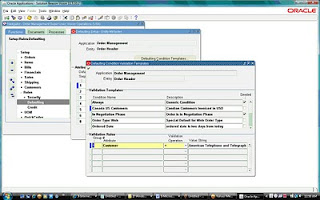
Currency Default using defaulting Rules

Default USD Currency in Order Management for ABC Customers in ABC Operating Unit.
Define defaulting rules to determine the source and prioritization for defaulting order information to reduce the amount of information you must enter manually in the Sales Orders window.
You can create rules to determine the source and prioritization for defaulting order information to the Sales Orders window. Modifications to defaulting rules take effect for any new orders when you reopen the window
A defaulting rule is a value that OM automatically places in an order field of the sales order window. Defaulting rules reduce the amount of information one must enter. A defaulting rule is a collection of defaulting sources for objects and their attributes.

A defaulting rule includes these components:

Defaulting Conditions-Defaulting conditions are evaluated at run time to select the appropriate default source assignments of for all the object attributes
Sequence: the priority in which you want to retrieve the default for this attribute.
Source:
Entity
: a region on the window
Attribute: individual fields of a particular entity.
Value: a constant defaulting value instead of a field that contains a value.
Defaulting Source/Value - Profile Option, constant value.
Responsibility: Order Management Super User
Navigation: Setup > Rules > Defaulting

Query for the Application: Order Management
Entity: Order Header


Put the Cursor on the attribute: Customer and click Defaulting Condition Template


Enter the Validation Temple Condition Name : CN USD Customers
Description : Canadian Customer Invoiced in USD
Enter the Validation Rules
Group#:1
Attribute: Customer
Validation Operation: =
Click Value String and enter the sold to customer (Note the customer#)
Defaulting Flex Field is displayed .
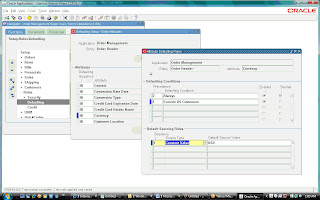
Put the Cursor on the attribute: Currency and click Attribute Defaulting Rule
Defaulting Condition:
Precedence:1
Defaulting Condition: Canada US Customers
Defaulting sourcing rule:
Sequence:1
Source Type: Constant Value
Default Source/Value: USD

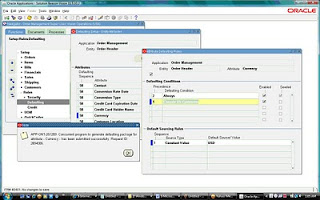
Save the form and run the Generate Defaulting handler Package (Tools > Generate Defaulting Handler Package) a note is displayed as given below and a Default Generator concurrent job is run.
.


you will get a message given below click OK


click OK you will get a note message given blow:

click OK


Create a Order of the customer default currency will CAN as soon you enter the customer# in the order form the currency changes to USD.

Sunday, January 31, 2010

Consolidation (GCS, HFM, FCH)

Consolidation:

Consolidation is the period–end process of combining the financial results of separate subsidiaries with the parent company to form a single, combined statement of financial results.

GCS is a multi-source consolidation solution that can accumulate information from diverse financial systems, geographic locations, including Oracle and non-Oracle Applications. With GCS one can consolidate data from multiple SOBs, multiple instances and non-Oracle applications.

With Oracle General Ledger, you can consolidate any number of subsidiaries into parents represented by different sets of books – even those with different Chart of accounts, Currencies and Calendars.

•Consolidation of companies within a Set of books.
•Consolidation of companies across multiple Sets of Books in the same instance.
•Consolidation of companies across multiple Sets of Books across multiple instances.
•Accounting for some companies is maintained in non-Oracle applications.

What you can Consolidate:

1) Chart of Accounts: Map any subsidiary chart of accounts structure into your consolidated parent,regardless of differences in the account structure.
2) Level of Detail: Consolidate detail transactions, detail balances, or summary balances.
Balance Type: Consolidate actual, average, translated, budget, and statistical balances.
3) Calendar: Use any accounting calendar for the parent set of books into which you consolidate your subsidiaries.
4) Currency: Maintain subsidiary sets of books in a different currency than your parent. Simply revalue and translate balances as needed before transferring consolidation data to your parent.

GL Consolidation Steps:

1.Create Consolidation mapping: parent and subsidiary sets of books.
2.Post all Journals in subsidiary set of books.
3.Revalue foreign currency balances in subsidiary sets of books.
4.Translate subsidiary balances to the functional currency of parent set of books
5.Run and review trial balance report.
6.Transfer data from subsidiary to parent.
7.Run Journal import.
8.Post the consolidation journal in parent set of books.
9.Eliminate intercompany balances.
10.Run trial balance and other financial reports.

Steps to perform consolidation:

1.Map Consolidation Data.
2.Prepare Consolidation Data.
3.Transfer Consolidation Data.
4.Review and Post consolidation JE.
5.Generate and review eliminating Entries.
6.Report on Consolidated balances.
7.Analyze Consolidated Results.


Consolidation workbench:
The Consolidation Workbench provides a central point of control for consolidating an unlimited number of subsidiaries to your parent, while keeping you informed about each subsidiary’s consolidation status. The workbench also monitors subsidiary account balances for any changes that occur after the subsidiary data has already been transferred to your parent set of books.

Functional Step State Controller Buttons
Map Consolidation Data -- Mapping, Mapping Set
Prepare Subsidiary Data -- Translation Status
Transfer Consolidation Data --Transfer, Transfer Set
Post Consolidation Data -- Review Journal, Post
Eliminating Entries -- Eliminate, Elimination Set
Report on Consolidated Balances --Report


Consolidation Process:


1.Define Consolidation Charts of Accounts: Make sure your parent and subsidiary charts of accounts can help simplify the consolidation process.
2.Map Consolidation Data: The first step in an actual consolidation is to define how your subsidiary accounts map to your parent accounts. The mapping determines how your subsidiary balances roll up into the consolidated ledger.
3.Prepare Consolidation Data: You should revalue and translate any foreign currency amounts from your subsidiaries before consolidating them to the parent set of books.
4.Transfer Consolidation Data: Once your subsidiary data has been prepared, transfer it to the parent, where it will be consolidated.


Preparing Consolidation Data:

1.Revalue Balances: if any sets of books have balance sheet or income statement accounts denomination in a foreign currency.
2.Translate Balances: for any subsidiary books that use a functional currency that differs from the parent.
3.Run a trial balance: for each subsidiary set of books using the parent set of books functional currency.
4.Review: subsidiary balances before transferring them to the parent.

Foreign Currency Concept:
There are 3 Concepts in Oracle General Ledger that pertains to foreign Currency

Conversion: conversion refers to foreign currency transactions that are immediately converted at the time of entry to the functional currency of the set of books in which the transaction takes place.
Revaluation: Revaluation adjusts liability or asset accounts that may be understated or overstated at the end of a period due to a significant fluctuation in the exchange rate between the time the transaction was entered and the end of the period. It restates balances using proper period end rate.
Translation: Translation refers to the act of restating an entire set of books or balances for a company from the functional currency to a foreign currency.

Consolidation Methods
When the consolidation is run, consolidation journal entries are created in the parent set of books for all the subsidiaries selected.

•If you choose the Balances method, the resulting consolidation journal will include the account balances for all the subsidiaries that were run.
For example, if a subsidiary had five transactions that made up the balance of the sales account, the consolidation journal entry will include the balance of the sales account, and not the individual transactions (based on the mapping rules).

• If choose the Transactions method, the resulting consolidation journal will include the transactions for all the subsidiaries that were run.
For example, if a subsidiary had 5 transactions for the sales account, the consolidation journal entry will include each transaction.

When a Consolidation is run, Oracle General Ledger submits a Concurrent process that populates the GL_INTERFACE table with Consolidation data.


The table below lists all possible statuses for consolidation processes displayed in the status column.

Reports:
  • Use the FSG as the mechanism to sum up the subsidiaries to produce consolidated results in case of Single SOB.
  • In case of companies having multiple SOB / non-Oracle Application, use FSG to report on consolidated results.
  • Use the ADI to extend reporting to the spreadsheet environment. ADI allows to create and publish consolidated reports in HTML format to the Internet or corporate intranet.
  • Run a Trial Balance Report for each subsidiary after revaluation and translation.
  • Consolidation Rules Report.
  • Consolidation Unmapped Subsidiary Report
  • Disabled Parent Accounts Report.
  • Consolidation Rules Report.
  • Consolidation Journals Report.
  • Consolidation Audit Report.
  • FSG reports.
Oracle Hyperion Financial Management (HFM) is a financial consolidation and reporting application built with advanced Web technology, but used and maintained by the finance team. It provides financial managers the ability to rapidly close and report financial results, meet global regulatory requirements, reduce the cost of compliance and deliver confidence in the numbers.

Features:

•Simple to Customize
•Easy to Integrate
•Financial Data Quality
•Complete Audit Trails
•Flexible Workflow
•Powerful Reporting
•Finance owned & operated

Benefits:

•Confidence in the numbers
•Reduce cycle time
•Automate collection & validation
•Lower cost of compliance
•Speed and agility


Oracle Financial Consolidation Hub: (OFCH/FCH)
Oracle Financial Consolidation Hub is a key component of Oracle Corporate Performance Management, a comprehensive solution for improving performance across your business

OFCH is
•A comprehensive consolidation and reporting solution that brings together financial data from different sources to create a single, global view of financial information across the entire enterprise.
•A critical bridge between traditional financial applications and analytic applications by using Enterprise Planning and Budgeting

FCH Features:

  • Data collection from different sources
  • Automated consolidation processing
  • Flexible eliminations and calculations
  • Acquisition and disposal handling
  • Multi-dimensional reporting and analysis
  • Consolidation dashboard
FCH Big Picture:


Source: My OracleSupport

Saturday, December 26, 2009

Accounting Method Builder (AMB) ,Event Classes and Event Types

Subledger Accounting is a new set of tools, accounting engines and repsoitory. Accounting Method Builder is a part of Subleger accounting.

Accounting Methods Builder:
  • Toolset to define Journal Entry rules for the transactions and events of a subledger application.
  • Allows defining multiple sets of rules to be used concurrently for different requirements.

How Accounting Methods Builder works Journals are split into three main components:
1.Description
2.Line Types
3. Account Derivation Rules.

Event:
Subledger Accounting introduces the concept of events for the transactions. An event is the recording of a change of status in the transaction life cycle (for example, an invoice has been approved, a payment has been cancelled, a period has been closed, etc.). This is a fundamental component of the design to allow a clear separation between transactions and their accounting representations.Since events are the bridge between the transactions and the journal entries.


Event Model: Definition of the subledger transactions types and lifecyle.
Event Class: Classifies transaction types for accounting rule purposes.

Payables - Invoice, Debit Memo, Prepayment, Payments, Refunds.


Receivables - Invoice, Deposit, Receipt and Bill Receivables.

Purchasing - Requistion, Purchase Order.

Event Type: Accounting event types represent the business operations that can be performed on the event class. An accounting event always has an associated event type.

For each transaction type, defines possible actions with accounting singnificance.

- Payables Invoice - Validated, Adjusted, Cancelled.


-Receipt - Created, Applied , Unapplied , Updated , Reversed. Adjusted.


-Purchase Order - Created, Distributed, Cancelled, Rejected, Finally Completed.

Oracle Subledger Accounting introduces a new Subledger Accounting Rules Detail Listing Report to provide detailed information about accounting rules defined for a subledger accounting method. The report can be submitted from the individual subledger applications or from Oracle General Ledger.
In addition, the report can be submitted for custom applications registered within Oracle Financial Accounting Hub.Users can now use the new report to easily review the following setup details:
• Subledger Accounting Method
• Journal Line Definition
• Journal Line Type
• Account Derivation Rule
• Journal Header Description
• Journal Line Description.

Tuesday, December 22, 2009

R12.1.X New Features

Ledger Architecture
- Ledgers: Define by Chart of Accounts, Calendars, Currency and Accounting Conventions.
- Ledger Sets: Group of Ledgers sharing the Same Chart of Accounts and Currency.

Centralized and Flexible Rules based Accounting Engine
- Ruled based engine with configurable accounting rules
- Single source of truth for accounting, reconciliation and reporting with common data model and repository and posting engine.
- Consistent data model and user interface across all subledgers.

Centralized Legal Entity Management
- Manage Legal Corporate Structure
- Link tax, intercompany, bank account and accounting functions
- Isolate legal compliance issues at legal entity from the management and security issues at operating Unit.

Centralized Banking and Payments
-Single user interface for all setup and maintenance related to banks and internal bank accounts.
-Centralized management of all funds capture and disbursements
-Centralized credit card management.

Centralized Global Tax Processing
-Centralized Tax Engine with single data model for rules and transations across geographes and applications
-Centralized tax repository for global visibility
-Simplified tax configuration across legal entities and oracle apps.

Advanced Global Intercompany system
- Centralized intercompany and intracompany accounts setup
- Fully configurable approval rules and invoicing options.
- Physical Payables and Receivables intercompany invoice generation.

Oracle General Ledger:

- Single Page for all accounting setup with Accounting Setup Manager.
- Prevent Accounting errors with Alternate accounts
-Replacement for Disabled Accounts
-Prevent unauthrized posting with Control Accounts
-Simplify security and Data Access and Definition Access sets.
-Sequential numbering of accounting entries
-Journal line reconciliation-Journal Batch Copy
-Historical Data initialization for new reporting currencies and secondary ledgers.

Oracle Payables:

- Pay on behalf of a different party with 3rd party payments
- Greater flexibility in defining and calculating discounts for quick payments.
-Application of withholding taxes at time of invoice validation and during payment
-Improved resolution for dispute processing with suppliers.
-Imporve invoice data entry and management with line level entry, approval, matching and tax calculation.
-Automated netting of Customer and Supplier balance
-Self-Service invoivce allows employees and suppliers to enter various invoice type online.
-New interface and data model for supplier managment in TCA.


Oracle Receivables:
-Streamlined receipt porcessing with cash application work queue.
-Enhanced performance for high volume receivables processing.
-Synchronize Cost of Goods Sold(COGS) with Revenue.
-Increased efficiency with line level cash application.
-Improved billing communcation with balance forward billing.
-Create standard late charge polices that can be assigned to customer accounts or account sites.

Oracle Advanced Collections:
- Assign bankruptcy status at the customer level
- Effetively manage later stage delinquency status assignment at case and contract level.
- Internal only comment visibility for dispute processing.
- Streamline system setup and operational maintenance with implementation checklist.
-Consolidation of collections features provides collections workbench
-Improved ability to collect with enhanced dispute management.

Oracle Assets:
- Flexible accounting configuration
- Automated depreciation rollback for selected assets
- Enhanced mass additions interface for legacy conversions
- Unplanned depreciation(impairments) for energy industry
- Unit of production and straight line depreciation methods for O&G industry.
- Flexible reporting with BI Publisher.

Source: My Oracle support