Sunday, November 1, 2015

Oracle Business Application (OBA) , Oracle Business Intelegence Application (OBIA) and OBIEE for Oracle Applications

Oracle Business intelligence enterprise  (OBIEE) is a comprehensive business intelligence platform that delivers a full range of capabilities including:
-Interactive dashboards
-Ad hoc queries
-Enterprise and Financial reporting
-Notifications and alerts
-Scorecard and Strategy management.

OBIEE Architecture:


Web logic Server: Managing and monitoring Java components
Enterprise Manager: Managing and Monitoring System components
OPMN: Oracle Process Manager and Notification for managing and monitoring system components
Oracle BI Admin Tool: Managing metadata repository

A Three layer data model file which represents
- Presentation: The data visible to the end user
- Mapping: The layer were data is transformed
- Physical: The physical data source

Oracle e-Business (EBS):

You need to define the link from to Oracle EBS to Oracle BI. This functionality hasn’t changed and  Combined with the ‘FND: Oracle Business Intelligence Suite EE base URL’-profile option in Oracle eBS, you now are ready to navigate from Oracle eBS to Oracle BI.

Once The setup for Integrating Oracle eBS and OBIEE is complete. We can create links between the two. These links should make it possible to navigate from Oracle eBS to OBIEE and vice versa

Oracle EBS - OBIEE:
To embed a link in Oracle E-Business Suite that opens Oracle Business Intelligence dashboards, you need to create a form function and then assign menus and responsibilities.

Before you begin, log in to Oracle E-Business Suite as the system administrator . Then, select the System Administrator responsibility from the responsibility navigator pane on the left. The available menus appear on the right.

Follow the steps in this section to create the following objects, in sequence:

  • Function
  • Menu
  • Responsibility
  • User
  • Profile


Assign responsibility to User and assign Profile at site level -  FND: Oracle Business Intelligence Suite EE base URL

On the resulting screen, specify the Oracle Business Intelligence URL. For example: http://my_server.domain.com:port 

example at site level : http://fa5099-obiee.oracleads.com:8080


Run the below script to check if these setups are complete or update the script as per your requirement.


SELECT   fa.application_short_name
, fa.application_name
, fda.application_short_name data_application_short_name
, fda.application_name data_application_name
, fdg.data_group_name
, frt.responsibility_key
, frt.responsibility_name
, frt.description responsibility_description
, fff.function_name
, fff.description function_description
, fff.user_function_name
, fm.menu_name
, fm.user_menu_name
, fm.description menu_description
FROM apps.fnd_menus_vl fm
, apps.fnd_form_functions_vl fff
, apps.fnd_menu_entries_vl fme
, apps.fnd_responsibility_vl frt
, apps.fnd_application_vl fa
, apps.fnd_application_vl fda
, applsys.fnd_data_groups fdg
WHERE fm.menu_id = fme.menu_id
AND frt.menu_id(+) = fm.menu_id
AND frt.responsibility_key LIKE '%OBIEE%'
AND fme.function_id(+) = fff.function_id
AND fa.application_id = frt.application_id
AND fda.application_id = frt.data_group_application_id
AND fdg.data_group_id = frt.data_group_id
ORDER BY frt.responsibility_key;
---------------------------------
SELECT fff.function_name
, fff.user_function_name
, fff.description
, fff.type function_type_code
, fft.meaning function_type
, fff.web_host_name
, fff.web_html_call
FROM apps.fnd_form_functions_vl fff
, fnd_lookups fft
WHERE fft.lookup_code = fff.type
AND fff.function_name like '%OBIEE%F'
AND fft.lookup_type = 'FORM_FUNCTION_TYPE';


Oracle Business Intelligence Applications (11.1.1.8.1/11.1.1.9.1)   is a suite of pre built business intelligence solutions that deliver role-based intelligence. Oracle BI Applications support pre built aggregation and analysis of information from a variety of transactional applications, including Oracle E-Business Suite, Oracle Siebel, PeopleSoft, JD Edwards Enterprise One, as well as non-Oracle applications like SAP etc . These transactional applications are referred to source systems, because they provide the underlying data that source analyses

OBIA is a pre-build solution that includes hundreds of standard reports, metrics and dash boards as well as a rich and broad foundation of meta data that can be used to easily create custom reports and dash boards.

Oracle Business Intelligence Applications are complete, prebuilt BI solutions that deliver intuitive, role-based intelligence throughout an organization. These solutions enable organizations to gain more insight and greater value from a range of data sources and applications including Oracle E Business Suite, PeopleSoft, JD Edwards, Siebel, and third party systems.                        

it is Pre Built solution for variety of ERP  Applications Financials, SCM, CRM, HRMS , it  is built on suit of tools which involves ETL, ELT and primary based on oracle BI Enterprise edition reporting tool set, it contains a prebuilt warehouse. Oracle BI apps pulls data from ERP Systems onto prebuilt dashboards and reports for financials it comes with 16 pre built components and meta data for reporting purpose. it also contains prebuilt ETL to extract data from various sources like ERP.

 BI solution is pre built & it means:
  • A pre built data warehouse schema, the Oracle Business Analytics Warehouse, with associated extract, transform, and load (ETL) metadata and data-movement infrastructure to support aggregation and transformation for the analysis of data from all transactional sources
  • A pre-built Oracle BI Applications metadata repository to support analysis of the data in the Oracle Business Analytics Warehouse.
  • A suite of metrics pertaining to how organizations measure performance that your company can select from and apply to your particular line of business.
 Oracle BI Applications are built on the Oracle BI Suite Enterprise Edition, a comprehensive and market leading BI platform. This enables organizations to realize the value of a packaged BI application, such as rapid deployment, lower TCO, and built-in best practices, or to build custom BI applications—all on one common BI foundation.

Oracle Business Intelligence Applications includes the following:
         
Oracle Financial Analytics
Oracle Human Resources Analytics
Oracle Procurement and Spend Analytics
Oracle Project Analytics
Oracle Supply Chain and Order Management Analytics
Oracle Sales Analytics
Oracle Service Analytics
Oracle Marketing Analytics
Oracle Contact Center Telephony Analytics
Oracle Loyalty Analytics
Oracle Price Analytics

Oracle data integrator as an integration platform
- Pre-built warehouse
- Pre-built ETL
- Pre-built Meta data
- Oracle Business analytic Warehouse

Components of OBIA:
- Setup Tier: BI Configuration Manager, Functional Setup Manager.
- Data load Tier: ODI Agent, ODI Console, Load Plan Generators, Configuration Manager
- Reporting Tier: OBIEE Agent

Repositories: BA Warehouse, BI Application Components Repository, ODI repository
Files: BI Application RPD, BI Application presentation Catalog, Configuration Files.

OBIA- Finance Analytics:


  1. Oracle Business Intelligence Applications Configuration Manager
  2. Perform Functional Configurations (Functional setup manager)
  3. Implementations
  4. Configure Offerings
  5. Implementation Projects tab
  6. Create Implementation Project
  7. Enter Basic Information
  8. check some modules
  9. save and open projects
New Data Lineage Tool allows customers and implementers to track lineage from source to target - improving information transparency across their enterprise

Configuration Management expands System Setup and Load Plan definition capabilities, including the registration of multiple instances for the same Product Line Version, UI enhancements to support DW connection configuration and Load Plan definition, and Load Plan definition migration

The different components of OBIA 11.1.1.8.1 are
  • Admin console
  • BIACM(Business Intelligence Applications Configuration Manager)
  • FSM(Functional Setup Manager)
  • ODI Console(Oracle Data Integrator Console)
  • RPD(Repository)
  • Catalog

OBIA Configuration Manager:


Click Define Business Intelligence Application Instance where you define source and target systems and configure all your modules in  Financials System Manager (FSM).
Sign into to Financial Setup Manager application.


The FSM helps you in creating all the configuration and all your application specific domain data loads.

Click Configure Offering link in the left side you get the list of offering and click the check box enable for Implementation.


Create a Load Plan: it helps to configure and create new load plan and it is used for generating the data and metadata to get dash board in the catalog link of the OBIEE.

In order to register an enterprise application it must exist in the environment and you must have access to the WLS Administrator security role as well as one of the other following roles:
  • Application Implementation Administrator
  • Application Implementation Consultant
  • Application Administrator
  • Application Developer
The steps required to integrate Oracle BI Applications with Oracle E-Business Suite Applications in the following ways:
  • Single Sign-On first into Oracle E-Business Suite and have that authentication passed through to OBIEE
  • Embed links to OBIEE dashboard/catalog in Oracle E-Business Suite pages
  • Create Action Links within Oracle BI EE reports and dashboards that take you back into Oracle E-Business Suite in context
  • Setup is required both on the E-Business Suite Application and OBIEE sides to perform this integration. These steps are detailed in this bulletin with an example of how to achieve this in the Oracle BI Applications. This document does not describe the mechanism to embed OBIEE charts, dashboards, or reports in the E-Business Suite application.

The different components that are responsible for the display of meaningful data on your dashboards. Functional configurations is an important task at each and every stage of BI implementation since accurate configurations and mappings translate to accurate data on dashboards.

These steps need input from the subject matter experts (SMEs)/ super users of your transactional source system to get the data right and when the technical folks show the BIACM and FSM UIs to functional SMEs for their input, the questions they would be asked are:
  • This UI does not make sense.
  • What is all that Mapping about?
  • Why you need that input?
The answer that would help:
These functional setups, based on either business requirements or on transactional source system settings or configurations, direct the manner in which relevant data is moved and transformed from source database to target database.
Functional setups are also called functional configurations which provides accurate and successful movement of data from (source system) EBS to (database to target Business Analytics Warehouse) Dashboard and they Control the manner in which data is displayed.

The implementation phases for Oracle BI Applications. A typical product lifecycle consists of the following process, some of which may happen concurrently.
  • Installation
  • OBIA architecture and components
  • Configurations
  • Data Load-Domain Load/Data Load/Incremental Load/Issues in Data Load
  • Customization to RPD
  • Customization to Dashboards
  • Migration


The Database layer has
  • Source System
  • OBAW
  • Business Analytics Warehouse                                                                                                                                                
  • Business Intelligence Applications Components Repository
  • Business Intelligence Applications I/O Schema
  • Oracle Data Integrator Repository for BI Applications
Components Deployed into Manager Server "bi_server1"
  • Oracle BI Applications Configuration Manager
  • Functional set up manager
  • Load plan generator
  • ATG Lite
Components deployed into Managed serer “Odi_Server1” are
  • ODI Console
  • ODI agent
  • Client tier
  • Console accessed through Web browsers.
  • ODI Studio is installed on a developer client machine. For BI Applications usage, ODI SDK must be installed along with ODI Studio.

Reference: support.oracle.com, OBIA/OBIEE user guide and implementation guide and note#555254.1, 1343143.1, 749190.1, 758392.1, 755768.1,1347159.1


Sunday, October 11, 2015

Oracle Fusion Applications Reporting Tools:

-Fusion Financials Reporting:
-Smart View
-Account Monitor
- Account Inspector
- OTBI-Oracle Transnational Business Intelligence
- Business Intelligence Publishers (BI Publisher)


Data Sources  for Reporting Tools in Fusion:


Different Roles have different Reporting needs:


  1.  Financial Reports When we speak about Financial Reports, we are talking about reports that look solely at GL balances.  These reports utilize the essbase cube to present financial data in a real-time environment without having to "run" a report.  These reports are defined using the FR Studio tool which has many features including hierarchy expansion and drill down
  2. Smart View is a desktop tool, available as a plugin to Excel. It is a more re-usable tool for your analysis – ie you can save your spreadsheet layout as a template for future use, and then refresh it with the latest GL balances whenever you reopen it. It can be used to construct ad-hoc analysis too, but is useful for inquiries that you perform regularly.
  3. Account Inspector is an online tool available from within Fusion Applications, so you can use it directly within Fusion GL. For example, when you are investigating account balance changes using the Account Monitor, you can choose whether to view the amounts in a table / graph, or whether to open them up in Account Inspector so you can manipulate the data to understand it differently. It is useful for ad-hoc inquiries against an account. 
  4. OTBI: Allows you to build ad hoc queries or reports using views on transnational business objects. With Fusion Financials, you can build your own reports using the OBIEE tool and subject areas delivered with Fusion.  With simple drag and drop functionality, you can build a report (or ad hoc query)

Saturday, September 26, 2015

Oracle Enterprise Repository (OER) - Oracle Fusion Application

 Oracle Enterprise Repository(OER) for fusion application provides the definitive catalog of integration related content to simplify Customization, Extensions and integration.


Fusion Application  Architecture:


Scenarios:

File based Loader (FBL):  FBL is a Data Loading Tool for Oracle Fusion Applications.

Full list of FBL Spreadsheet Loader available for Fusion Financials be found
The information exists in Oracle Enterprise Repository ( OER)
  •     Navigate to https://fusionappsoer.oracle.com
  •      Select the following parameters
  •     Version - The version you need the information for
  •     Product Family - Financials
  •     Type: Depending on what kind of service you need select either: ADF Service, ADF Service  Data Object or File Based Data Import

 File-Based Data Import: Shows which business objects can be imported into Oracle Fusion Applications using the File-Based Data Import tool.


File base Loader:  most of the fields are supported through FBL, like Supplier Creation, Customer Creation, CoA structure etc.

 To transfer the data file to the integrated content management server.

This is a required step when Using External Data Integration Services for Oracle Cloud to load data into Oracle Fusion Applications from external sources, such as legacy systems and third-party application


Login to Oracle Fusion Application

 Navigator > Tools > File  Import/Export.


ADFdi  (ADF Desktop Integrator) Vs FBL:
  • Both options based on Excel sheets, the number of rows that can be uploaded at any one time is limited to around 65,000. 
  • File based import or the Bulk Journals sheet in ADFdi would be faster since these sheets do not have any validations.
  • If using the Multiple Journals Sheet which has some validations, uploading in chunks of 10,000 to 20,000 rows would be faster than uploading 65,000 rows in one go.
  • The Journal Entry UI has a limit of 500 journal headers per batch and 100,000 lines per journal header. The journal will not be viewable if it exceeds these limits. 

Ref: Oracle Fusion apps user guide and implementation guide and support notes.

Saturday, September 5, 2015

Oracle Fusion Application and Oracle Fusion Financials Applications.

Using the latest technology and incorporating the best practices gathered from Oracle's customers, Oracle Fusion Applications is a suite of 100% open standards-based business applications that provide a new standard for the way businesses innovate, work, and adopt technology. Delivered as a complete suite of modular, service-enabled enterprise applications, Oracle Fusion Applications works with Oracle's Applications Unlimited portfolio to evolve business to a new level of performance. Whether it is one module, a product family, or the entire suite, Oracle provides businesses with their choice of all advancements pioneered by Oracle Fusion Applications, at a pace that matches individual business demands.
Standard Based Architecture
- Best Practices Business Processes
- Choice of Deployment options

Oracle Fusion Applications have been designed to ensure your enterprise can be modeled to meet legal and management objectives. The decisions about your implementation of Oracle Fusion Applications are affected by your:
• Industry • Business unit requirements for autonomy • Business and accounting policies
• Business functions performed by business units and optionally, centralized in shared service centers • Locations of facilities


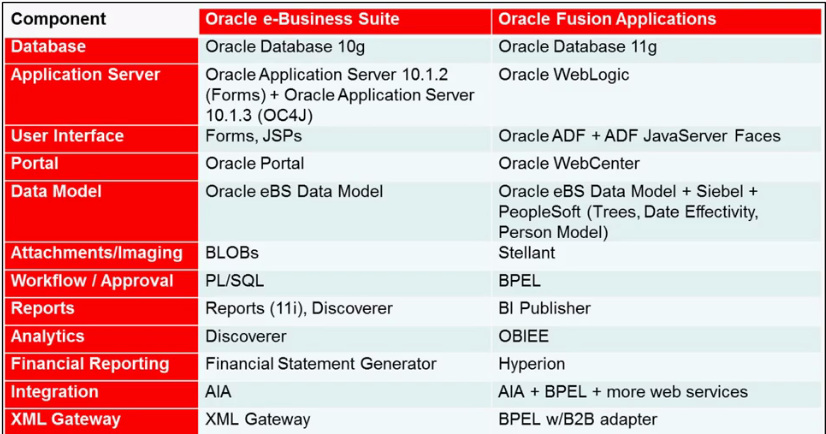
Oracle EBS vs Oracle Fusion Apps:


BPEL (also known as BPEL4WS or WS-BPEL), the Business Process Execution Language is an
XML based programming tool for language service composition.

Fusion Applications uses BPEL wherever process logic is implemented. BPEL replaces Oracle
Workflow. So where in EBS Releases 11i & 12 a process is organized by Oracle Workflow, in Fusion Applications BPEL is used. For example the GL journal approval is handled by Oracle Workflow in Release 12. In Fusion Applications this is done via a BPEL process.


Oracle Fusion Apps:

Oracle Fusion Financials Applications:


1.      Oracle Fusion Financials, which include general ledger, receivables, payables, asset tracking, expense management, and cash management functionality.
2.      Oracle Fusion Accounting Hub, providing the integration and reporting platform to effectively drive a coexistence strategy with your existing financial systems.


Oracle Fusion Financials provide features for:
1.       Receivable and collection functionality within the Order Fulfillment process
2.       Asset accounting and reporting within the Asset Life cycle Management process
3.       Cash management functionality within both the Order Fulfillment and Procurement processes
4.       Payable and payment functionality within the Procurement process
5.       Financial Control and Reporting including taxation, subledger accounting, general ledger, consolidation, and reporting functionally
6.       Expenses management functionality within the Compensation Management process
7.       Multi-GAAP compliance including approaches for simultaneous compliance with corporate and national regulators and standards.
8.       Currency compliance including capabilities for accounting in denomination and accounting currencies and for translation to functional or reporting currencies as required in compliance with the relevant principles within both the International Financial Reporting Standards (IFRS) and United States Generally Accepted Accounting Principles (GAAP).


.
Oracle Fusion Financials Phases:
To set up your companies, ledgers, and business units (BUs), Oracle Fusion Applications provide the Functional Setup Manager. The Functional Setup Manager empowers enterprises to decentralize the change management process and enables business users to change Oracle Fusion applications to fit their evolving business needs.

Functional Setup Manager:
  • Provides a predefined, guided list of tasks for a full end-to-end visibility to all setup requirements enabling business users with self-service to implement quickly what they need and when they need it.
  • Provides configurability of the Oracle Fusion offerings to mold the offerings to fit the business needs.
  • Provides export and import capability to let companies setup one instance and reuse it several times.
  • Provides a guided process making it easy to navigate through planning, implementation, deployment, and ongoing maintenance.
  • Provides a set of comprehensive reports to give full visibility to setup at any time.
The different phases in the Functional Setup Manager process are:
  • Getting Started
  • Setting Up the Task List Manager
  • Setting Up Import and Export
  • Maintaining the Functional Manager
1.      Plan and Configure phase: (Getting Started)
  • Plans and discovers what offerings, options, and features are available in Oracle Fusion applications
  • Researches the requirements
  • Analyzes the impact of the change
  • Selects the most suitable offering, options, and features based on the requirements
  • Creates the implementation project and assigns tasks

2.      Implementation phase

a)      Setting up the Task List Manager

  • Reviews and executes assigned setup tasks
  • Updates the status of the tasks
  • Adds attachments and notes
  • Validates the implementation. 

b)     Setting up Import and Export

·         Creates configuration packages and exports setup data
·         Imports the configuration package in another instance
·         Analyzes setup data report

3.      Maintaining the Functional Manager

  • Maintains the environment with ongoing setup changes
  • Updates setups due to event or time-based changes
Financial Sub-ledger Architectures:   Sub ledger architecture includes
  • Dashboard and work areas
  • Invoice imaging
  • Tax
  • Sub-ledger accounting
  • Reconciling subledger accounts


 Dashboard and work areas:
All Oracle Fusion Financials applications deploy dashboards. On a dashboard, work areas display tabulations of the tasks that a given role needs to accomplish. These are updated by incoming work load in real time. In Payables, for example, newly scanned invoices are tabulated for the Payables Specialist to process. In General Ledger, the accounts monitored by the accountant are updated at each journal posting. In Receivables, new invoices and receipts pending further actions are listed for the Billing Specialist and Receivables Specialist to process.   The tabulations are designed to be easily adjusted to suit your needs in several ways and can be modified, prioritized, and even replaced.
The work areas monitor processes and provide updates on status. Items awaiting approval, for example, are listed, as are items with issues, such as incomplete invoices and unposted journals. Social tools are available, so that any person who needs to act, such as an approver, can be contacted immediately. The tabulations support searching by example, saved searches, export to spreadsheet, and other actions, so that the work can be moved along without using menus or navigating away from the work area.

Invoice imaging:
In Oracle Fusion, image scanning is not just a plug in or add-on. The accounts payable process has been re-architectured to simplify data capture and eliminate work costs and activities.


You can scan the invoice from any location,   The scanned invoice is routed to the shared service center in any part of the world for centralized processing. The image is read by the system through smart optical character recognition centrally and the invoice data pages are largely prepopulated from the images. Imaging and routing facilitates speedy processing, as the invoice is complete and appears immediately in the work area of the Accounts Payables (AP) specialists. The AP specialists can compare the image and the data before approving it. Oracle Fusion Applications manages the file network system, document repository, image processing server, and the routing process with little or no human involvement.


Oracle Fusion Tax Architecture:
There are many kinds of transaction taxes, including sales tax, value-added tax (VAT), goods and services tax (GST), and customs duties.

The tax architecture includes the following tiers:
  • Tax Configuration: Foundation
  • Tax Determining Factors
  • Tax Configuration: Advanced
  • Services
  • Tax Management
The Tax Configuration: Foundation tier consists of:
  • Tax regimes and taxes, such as GST, VAT, and sales tax
  • Tax jurisdiction and tax authorities, such as California and Ireland
  • Tax status of different types of transactions, such as taxable or nontaxable transactions
  • Tax rates including recovery rates
The Tax Determining Factors tier identifies the factors that participate in determining the tax on an individual transaction. These taxability factors are:
  • Parties to the transaction, such as your companies, vendors, and customers
  • Products such as food, books, automobiles, and furniture, with each product having a different tax arrangement
  • Places of shipment and delivery
  • Business processes involved, such as sales, purchases, and inventory management
For example, you could be a legal entity registered for tax in Illinois and selling a product to another legal entity that is registered in Toronto. To sell your product, you must take into account, the following taxes:
  • Illinois sales taxes
  • US export taxes
  • Canadian import taxes
  • Toronto taxes
 The Tax Configuration:
Advanced tier leads you away from mainstream compliance into specialist cases. For example, the advanced configuration includes setting up tax rules to determine:
  • Tax regimes
  • State sales tax versus a national customs tax
  • Shipment and delivery details
  • Registrations, both yours and your customers and vendors
  • Tax basis that results from the combinations of the above considerations
  • Tax rates and recovery rates
Tax or recovery is calculated based on these and other factors. Tax recovery uses the Services tier to return the appropriate tax or recovery for the product to the entity requesting it. Other services include setup and partner integration services. Third-party tax partners deliver external data, such as tax rates, simplifying your tax processing.

The Tax Management tier includes:
  • Transaction taxes and related data that are stored in tax repositories and are delivered with reports. Standard reports are provided that you can use or copy to customize to meet your tax reporting requirements.
  • Configuration data that is stored in a configuration repository. Tax records are stored in a tax record repository.
Sub-ledger Accounting Architecture:

 Oracle Fusion Sub ledger Accounting takes data from both external and oracle fusion applications and accounts for that data in oracle fusion general ledger, populating the balances cube and preparing data for the sophisticated reporting capabilities available in the General ledger.


Sub ledger accounting uses a set of rules that it applies to sub ledger transaction data to determine the accounts to which the data is posted and to format & present the entries appropriately, using the rules the subledger accounting engine generates sub ledger journals and stores them in the sub ledger accounting repository as the preceding figure illustrates. It creates sub-ledger balances by customer and vendors. Sub-ledger accounting populates the sub-ledger balances and creates general ledger journals based on the frequency details and formatting options that you specify. The general ledger journals are recorded in the general ledger balance table and cube.

Sub-ledger Accounting is capable of generating entries for the same data according to different rules, facilitating reporting compliance to different conventions, such as statutory and corporate, or such as the old and the new principles when a new accounting principle is promulgated. It is anticipated that the Convergence of International Financial Reporting Standards (IFRS) and US Generally Accepted Accounting Principles (GAAP) will involve retrospective reporting under Leases, Revenue Recognition, and Financial Instruments for all US GAAP and IFRS filing groups.

Financial Control and Reporting:

The Financial Control and Reporting process delivers greater control of your enterprise financial management activities. It provides key users with better visibility of the entire process -- from capturing transactions and closing sub-ledgers to financial consolidation and reporting processes. The process provides greater accuracy in updating and reconciling general ledger accounts, with checks and balances across all subledger systems.


Reference: https://docs.oracle.com/en/  and  https://support.oracle.com, Fusion user guide and implementation guides.   

Oracle Fusion Application -Oracle Cloud Termonolgy

Oracle Fusion: Oracle Fusion Applications is Oracle's next generation suite of applications that eventually replace E-Business Suite. It will assimilate best of breed features from:E-Business Suite, JD Edwards, PeopleSoft. Siebel.

New Standard for Business through Innovation, Work and Technology Adoption.

Innovation: Lower cost IT Talent, Lower Cost Integration, Upgrade Friendly (zero upgrade impact)
Work: What do i need to know (Exception based Management), What do i need to do (BI) , who do i need to reach (Configurable application and Process) , how do i get it done.(Collaboration).
Adoption:  Deployment option  are Public Cloud, Private Cloud, On Premise and  Hybrid

Oracle Fusion Middle Ware (OFM/FMW): Comprises of the Oracle Application Server and other technology stack components that Oracle has acquired in past few years.
  • Fusion Middleware is a family of middleware products covering areas like BI, Identity Management, Content Management , SOA and Multiple services including Java EE and developer tools, integration services, business intelligence, collaboration, and content management
  • Each of these areas has it's own stack of products. Fusion Middleware was previously called Oracle Application Server.
                              Oracle Fusion Middleware

Terminology Difference between Oracle EBS  and Oracle Fusion Apps:

Oracle Fusion Application:


Here are some reasons why companies are moving to Oracle Fusion.
  • It’s positioned as the next-generation Business Applications solution by Oracle
  • It offers the best-of-breed from enterprise solutions acquired by Oracle
  • It’s built on a service-oriented architecture and SaaS model.
  • Unified Business Process Management
  • Roll based user experience..
  • Metadata  Services (MDS) and MDS Customization Engine,
  • Real Time access to Financials Information and HCM Information and its Analytical capabilities.
  • Reporting is based on Oracle Essbase (Online Oracle Processing Server)
Upgrading: Replacing an existing Oracle Applications instance with a new release (either a currently installed Oracle Applications version or Oracle Fusion Applications) 

Reimplementation: Treating an existing Oracle Applications installation as a “legacy system” and implementing some components of a live Oracle Fusion Applications installation or an entirely new Oracle Fusion Applications installation 

Coexistence: Adding Oracle Fusion Applications solutions to a customer’s existing Oracle Applications solutions, rather than upgrading or implementing new solutions in place of existing solutions 

Migration of data: Converting data from one Oracle instance to another Oracle instance by using Oracle’s Open Interfaces API and other Oracle or third-party conversion tools

Oracle Cloud Terminology:

Account:A unique customer account that can have many Oracle Cloud services. The account corresponds to an individual, an organization, or a company that is an Oracle customer. Each account has one or more identity domains.
An account must have at least one account administrator who is responsible for activating Oracle Cloud services, creating identity domains, monitoring status and usage, and designating other users as account administrators.
To register for a trial or purchase a subscription to an Oracle Cloud service, you must have an Oracle.com account. If you do not have an Oracle.com account, the system prompts you to create an account the first time you attempt to sign up for an Oracle Cloud service.

Service: A software offering in Oracle Cloud. Oracle offers social, application, and platform services

Data center:A facility used to house computer systems and associated components.
Oracle provides data centers in various geographical regions. An identity domain and the services associated with that domain must belong to a specific data center.

Identity domain:Controls the authentication and authorization of the users who can sign in to an Oracle Cloud service and what features they can access.
An Oracle Cloud service must belong to an identity domain. Multiple services can be associated with a single identity domain to share user definitions and authentication. Users in an identity domain can be granted different levels of access to each service associated with the domain.

Oracle Public Cloud Services Account / Identity Domain:n the case of Oracle Public Cloud Services, an account is a unique customer account that can have multiple Oracle Public Cloud Services of different service types.
For example, You can have three different instances of Oracle Public Cloud Services, such as Java, Database, and IaaS in a single Oracle Public Cloud Services account, but you cannot have multiple instances of Oracle IaaS Public Cloud Services in a single account.
Account creation results in creation of an identity domain (IDM slice) for that customer that is leveraged across all Oracle Public Cloud Services services (and across all data centers). During the Oracle Public Cloud Services account setup process, the customer needs to create an account and specify an account name. Using the specified account name, that the identity domain will be implicitly created.

Service association:An association between service instances that are part of the same identity domain. For example, a new Oracle Java Cloud Service trial automatically includes a new Oracle Database Cloud Service in the same identity domain. Similarly
If an identity domain has an existing Oracle Application Cloud service, such as Oracle Sales Cloud, you can associate any other Platform as a Service offerings, such as Oracle Java Cloud Service - SaaS Extension or Oracle Database Cloud Service, in the same identity domain.

.Service instance:An instance of one of the service types. For example, an instance of an Oracle Java Cloud Service. A service instance can be a slice of a multi-tenant service infrastructure or a dedicated single tenant service infrastructure.

Service name:A name assigned to your Oracle Cloud service. The name must be unique within the identity domain. You can add a longer description to a service to help you identify it, after it is activated. For more information,

Service notification:An event reported on the Notifications page that does not require administrative action. This type of notification provides information about upcoming system-wide and service-specific events, such as outages and blackouts.

Trial subscription:An Oracle Cloud service that is available for free for 30 days, for trial and evaluation purposes only.

Utilization:Metrics that show how much system resources are being consumed by a service. You can use either the My Account or the My Services application to view the utilization metrics for a service.